EducationSoftwareStrategy.com
StrategyCommunity

Knowledge Base

Product

Community

Knowledge Base

TopicsBrowse ArticlesDeveloper Zone

Product

Download SoftwareProduct DocumentationSecurity Hub

Education

Tutorial VideosSolution GalleryEducation courses

Community

GuidelinesGrandmastersEvents
x_social-icon_white.svglinkedin_social-icon_white.svg
Strategy logoCommunity

© Strategy Inc. All Rights Reserved.

LegalTerms of UsePrivacy Policy
  1. Home
  2. Topics

KB15581: How to see all of the user groups that a particular user or user group belongs to by using MicroStrategy Administrator - Command Manager 9.x


Community Admin

• Strategy


How to see all of the user groups that a particular user or user group belongs to by using MicroStrategy Administrator - Command Manager 9.x

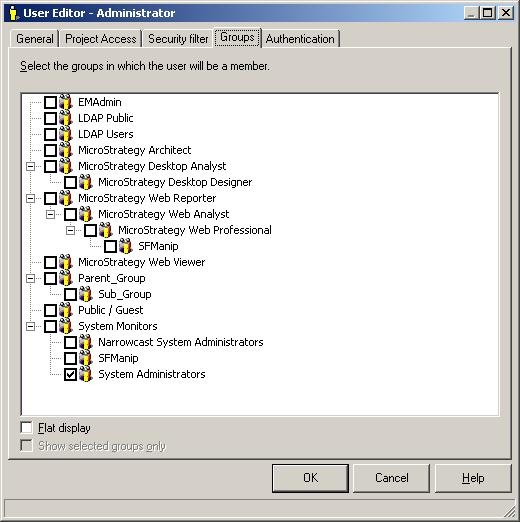
Through the User Editor, Administrators can see what groups any user or group is part of in Strategy Administrator - Command Manager 9.0.x by going to the Groups, tab as shown below:
 

ka04W000000OeHgQAK_0EM440000002BX5.jpeg

 
However, a faster way to see all available groups that a particular user or group is part of is in Strategy Administrator - Command Manager 9.x is to run the following script:


LIST GROUPS FOR USER "user_name";
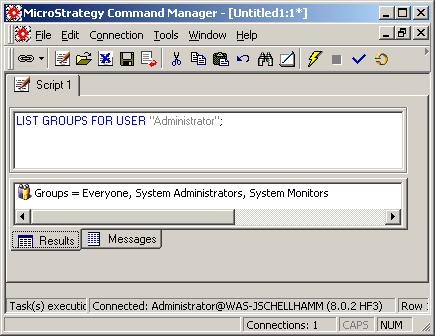
 

The output will be as follows:
 

ka04W000000OeHgQAK_0EM440000002BWz.jpeg

 
Also, what can be even more useful is that for one particular group, the groups that each individual user is part of can also be retrieved by using the following script:


LIST GROUPS FOR USERS IN GROUP "group_name";
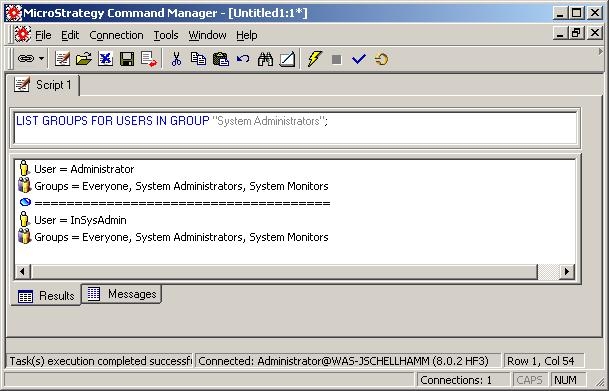
 

The output would be as follows:
 

ka04W000000OeHgQAK_0EM440000002BX2.jpeg


Comment

0 comments

Details

Knowledge Article

Published:

June 12, 2017

Last Updated:

June 12, 2017