EducationSoftwareStrategy.com
StrategyCommunity

Knowledge Base

Product

Community

Knowledge Base

TopicsBrowse ArticlesDeveloper Zone

Product

Download SoftwareProduct DocumentationSecurity Hub

Education

Tutorial VideosSolution GalleryEducation courses

Community

GuidelinesGrandmastersEvents
x_social-icon_white.svglinkedin_social-icon_white.svg
Strategy logoCommunity

© Strategy Inc. All Rights Reserved.

LegalTerms of UsePrivacy Policy
  1. Home
  2. Topics

KB15582: When running a Command Manager script within Command Line an "Invalid Project Source" error appears even though connection to the project source can be made through Developer 9.x and Command Manager 9.x.


Stefan Zepeda

Salesforce Solutions Architect • Strategy


This technical note describes the details of an error "Invalid Project Source" that is displayed when running a Command Manager script within Command Line

SYMPTOM
The user can successfully connect to a project source within Strategy Developer and Strategy Command Manager.  But when the user runs a Command Manager script within Command Line, the user receives the error, "Invalid project source."

ka044000000kLfxAAE_0EM440000002DMI.png

 
CAUSE
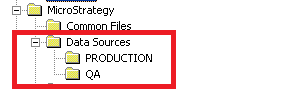
Upon checking the registries, the project source in question (including CastorServer and other system created project sources) are not there as shown below.
 

ka044000000kLfxAAE_0EM440000002DMG.png

 
ACTION
Delete all project sources from Strategy Developer and perform a repair/install of Strategy and then recreate the project sources.
 
WARNING
Modifying registry values incorrectly may cause serious, system-wide problems that may require the re-installation of Microsoft Windows NT. Any edit of the registry is done at the user's own risk. Since these are user-initiated changes, they are not covered by any Strategy warranty. If using Microsoft Windows NT, the user should back up the registry and/or update an Emergency Repair Disk (ERD) prior to alterations.
KB15582


Comment

0 comments

Details

Knowledge Article

Published:

June 12, 2017

Last Updated:

December 3, 2018