SYMPTOM:
A user would like to export a report from Strategy Developer or Web to Microsoft Excel having only the metric values and discarding the column headers data. Modifying the Export preferences to show only 'Report Data' does not yield to the desired output, as shown below:

CAUSE:
It is not possible to export the report with no column headers with Strategy Developer or Web. An enhancement request has been logged for this functionality.
ACTION:
This issue has been addressed with Strategy Office version 9.0.0 and above. To display data only, use Strategy Office with following options:
Strategy Office Configuration > General > Grid > "Show metric values only."

WORKAROUND:
Create a Report Services document with the report content on the detail section. Do not add the attributes or metrics to the Detail Header Section, as shown below:
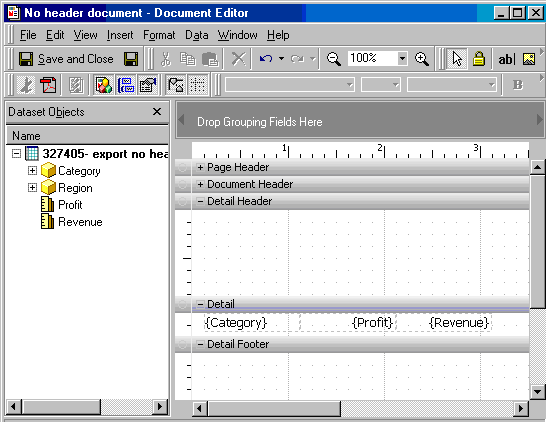
A new document with the same content but no headers will be generated. Exporting the document to Microsoft Excel will create the desired results, as shown below:
