EducationSoftwareStrategy.com
StrategyCommunity

Knowledge Base

Product

Community

Knowledge Base

TopicsBrowse ArticlesDeveloper Zone

Product

Download SoftwareProduct DocumentationSecurity Hub

Education

Tutorial VideosSolution GalleryEducation courses

Community

GuidelinesGrandmastersEvents
x_social-icon_white.svglinkedin_social-icon_white.svg
Strategy logoCommunity

© Strategy Inc. All Rights Reserved.

LegalTerms of UsePrivacy Policy
  1. Home
  2. Topics

KB15589: Subtotal functions for all metrics are set to match those for the first one on re-execution of a report containing an object prompt with at least one compound metric in MicroStrategy


Community Admin

• Strategy


This article notes an issue with subtotal functions set on object prompted metrics

SYMPTOM
After creating a new report in Strategy, containing an object prompt with at least one compound metric, and then assigning a different function for the sub-total for each of the selected metrics, the totaling behavior will be as expected on the first execution.  However, if this report is re-executed, it may be noted that the function chosen for the sub-total assigned to the first metric on the report will be permeated through to affect all metrics.
 
STEPS TO REPRODUCE
This behavior may be reproduced in the Tutorial project by taking the following steps:
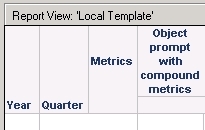
  • Create an object prompt including at least one compound metric, such as Average Revenue and Profit Margin.
  • Use this prompt in the columns of a new grid report.
  • Add the Year and Quarter attributes to the rows and enable sub-totals:

ka04W000000OajbQAC_0EM440000002DMS.jpeg
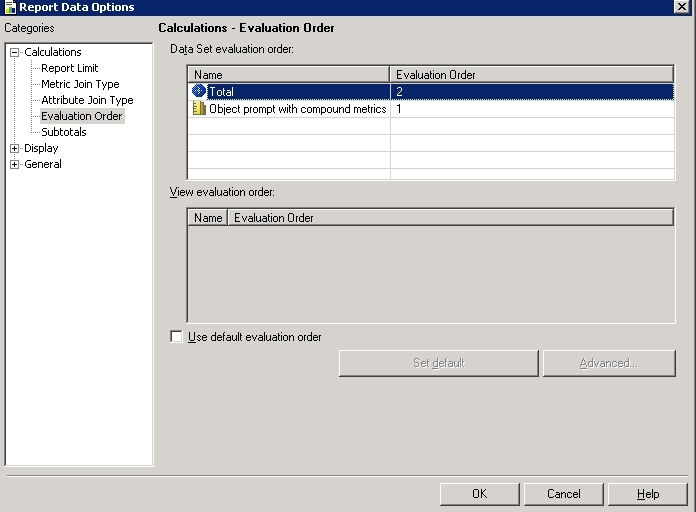
  • Set the evaluation order to calculate first the prompt and then the sub-totals:

ka04W000000OajbQAC_0EM440000002DMf.jpeg
  • Run the report with all metrics selected.
  • Create a new subtotal (across level), using a different function for each metric:

ka04W000000OajbQAC_0EM440000002DMW.jpeg
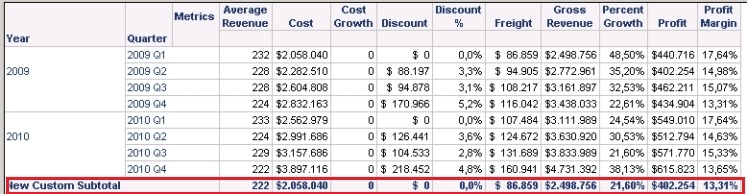
  • The sub-totals are as expected and are displayed as follows:

ka04W000000OajbQAC_0EM440000002DMU.jpeg
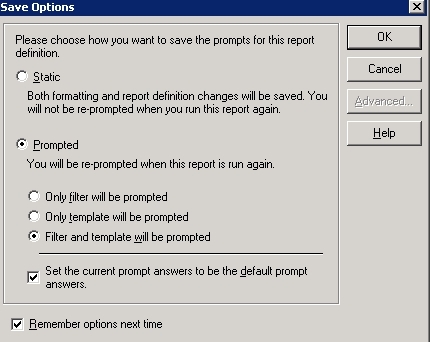
  • Save the report keeping at least the prompt on the template:

ka04W000000OajbQAC_0EM440000002DMm.jpeg
  • Re-execute the report, selecting all the metrics:

ka04W000000OajbQAC_0EM440000002DMc.jpeg
  • The function specified for the subtotalling on the first metric has been applied to all of those on the template: 

ka04W000000OajbQAC_0EM440000002DMX.jpeg
  • Please note that the sub-totals are now different from those given on the first execution of the report:

ka04W000000OajbQAC_0EM440000002DMh.jpeg

CAUSE
This represents a known issue when executing a report in Strategy. 
 
ACTION
Currently, this issue is still being reviewed for feasibility by our Technology team, and it is not scoped for any upcoming scheduled Strategy release. 
 
 
KB15589


Comment

0 comments

Details

Knowledge Article

Published:

May 26, 2017

Last Updated:

December 3, 2018