EducationSoftwareStrategy.com
StrategyCommunity

Knowledge Base

Product

Community

Knowledge Base

TopicsBrowse ArticlesDeveloper Zone

Product

Download SoftwareProduct DocumentationSecurity Hub

Education

Tutorial VideosSolution GalleryEducation courses

Community

GuidelinesGrandmastersEvents
x_social-icon_white.svglinkedin_social-icon_white.svg
Strategy logoCommunity

© Strategy Inc. All Rights Reserved.

LegalTerms of UsePrivacy Policy
  1. Home
  2. Topics

KB15611: How to pass prompt answers through multiple layers of Report Services documents via URL API using the originmessageID parameter in MicroStrategy Web


Community Admin

• Strategy


How to pass prompt answers through multiple layers of Report Services documents via URL API using the originmessageID parameter in MicroStrategy Web.

SYMPTOM:
When there are several Report Services documents that are linked together via URL API in Strategy Web, in order to retain prompt answers across all Report Services documents, each document must contain the same prompt (exact GUID) within the document. These prompt answers are then saved in the document instance which can then be extracted using the originmessageID.
 
STEPS TO REPRODUCE:
Follow the steps below to reproduce this issue (NOTE: Perform steps 1-13 in Strategy Desktop):
 

  • Create a prompt on the Customer attribute (Prompt #1).
  • Create a prompt on the Call Center attribute (Prompt #2).
  • Create a report (report A) with Prompt #1 and Prompt #2, and place Customer and Call Center on the template.
  • Create a report (report B) with Prompt #1, and place Customer on the template.
  • Create a report (report C) with Prompt #2, and place Call Center on the template.
  • Create a Report Services document that contains Report A as a dataset. (Doc A)
  • Create a Report Services document that contains Report B as a dataset. (Doc B)
  • Create a Report Services document that contains Report C as a dataset. (Doc C)
  • For all three Report Services documents, do the following:
     
    • Add their respective dataset as a grid to the detail header (with or without formatting).
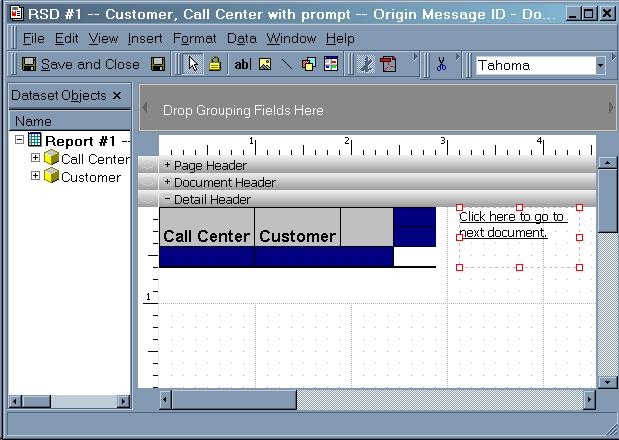
    • Add a textbox with the text 'Click here to go to next document' (only for Doc A and Doc B), as seen below:
ka04W000000ObHDQA0_0EM4400000028ns.jpeg
  • For Doc A, place the following URL in the 'hyperlink' section (editable through the properties list of the text box) created in step 9b:
    http://#WEB+SERVER+NAME#/MicroStrategy/asp/Main.aspx?evt=2048001&src=Main.aspx.2048001&documentID=#Doc+B+GUID# &server=#INTELLIGENCE+SERVER+NAME#&project=#PROJECT+NAME# &uid=#username#&pwd=#password#&originMessageID={&DOCUMENTMESSAGEID}
ka04W000000ObHDQA0_0EM4400000028nz.jpeg
  •  
    NOTE: Anything between # signs is specific to each environment.
     
  • For Doc B, place the following URL in the 'hyperlink' section (editable through the properties list of the text box) created in step 9b:
    http://#WEB+SERVER+NAME#/MicroStrategy/asp/Main.aspx?evt=2048001&src=Main.aspx.2048001&documentID=#Doc+C+GUID# &server=#INTELLIGENCE+SERVER+NAME#&project=#PROJECT+NAME# &uid=#username#&pwd=#password#&originMessageID={&DOCUMENTMESSAGEID}
    NOTE: Anything between # signs is specific to each environment.
     
  • Run Document A in Strategy Web.
  • Answer the prompts and remember what answers are chosen. After Doc A is executed, ensure that the only attribute elements that are seen on the grid are the elements that were answered for Prompt #1 and Prompt #2.
  • Click on the link in Doc A that reads 'Click here to go to next document'.
  • Notice that users do not have to answer Prompt #1 again for Doc B, as the same prompt was already answered in Doc A. Ensure that the answers selected in Prompt #1 match what is seen in Doc B.
  • Click on the link in Doc B that reads 'Click here to go to next document'.
  • Notice that users will be re-prompted for Prompt #2, even though Prompt #2 was already answered in Doc A.

CAUSE:
Doc C was re-prompted with Prompt #2 (that was answered in Doc A) because Doc B did not contain Prompt #2. Thus, there was no reference of Prompt #2's prompt answers in Doc B's document instance, which is why its originmessageID instance did not contain the prompt answers for Prompt #2.
 
ACTION:
In order to pass the answers from Prompt #2 from Doc A to Doc C through Doc B, then Prompt #2 must be added to the filter section of Report B.
 
15611


Comment

0 comments

Details

Knowledge Article

Published:

April 21, 2017

Last Updated:

March 28, 2019