EducationSoftwareStrategy.com
StrategyCommunity

Knowledge Base

Product

Community

Knowledge Base

TopicsBrowse ArticlesDeveloper Zone

Product

Download SoftwareProduct DocumentationSecurity Hub

Education

Tutorial VideosSolution GalleryEducation courses

Community

GuidelinesGrandmastersEvents
x_social-icon_white.svglinkedin_social-icon_white.svg
Strategy logoCommunity

© Strategy Inc. All Rights Reserved.

LegalTerms of UsePrivacy Policy
  1. Home
  2. Topics

KB15655: How to configure the MicroStrategy Intelligence Server 2020 and above to ignore LDAP chase referrals


Community Admin

Placeholder •


This article describes how to configure the MicroStrategy Intelligence Server to ignore LDAP chase referrals.

The 'authenticating user' credentials are set up in the Configuration tab of the LDAP settings in Strategy Intelligence Server configuration dialog box. These credentials are used by Strategy Intelligence Server when authenticating itself and running queries against the LDAP server. The Strategy Intelligence Server by default does not attempt to set the option to chase LDAP referrals explicitly. So, depending on the default action for the LDAP SDK used for integration of Strategy Intelligence Server and the LDAP server, referrals may be chased when returned in a search result.
 
In the Strategy Intelligence Server, administrators can opt to have Strategy Intelligence Server ignore referrals returned from the LDAP authentication server. This may be desirable where the 'referred to' server, does not support anonymous binding used when chasing the referral.
 
To activate this functionality in Strategy 2021 Update 6 and below, users must create an environment variable called MSTR_LDAP_REFERRALS and set the value for the environment variable to either 1 or 0. Note that if the MSTR_LDAP_REFERRALS variable does not exist, the default behavior is to chase the referrals.
 

  • 1 = Default - The LDAP chase referral is ON, and will be followed.
  • 0 = The LDAP chase referral is OFF, and will be ignored.

In a Microsoft Windows environment, follow the following steps to set this environment variable:
 

ka0PW0000000rFdYAI_0EM440000002BWv.png


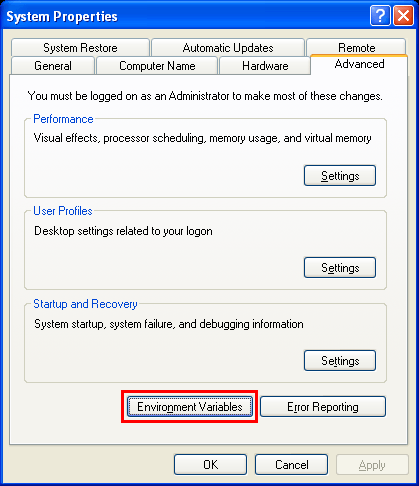
  • Navigate to the Control Panel > System > Advanced tab and click the button for 'Environmental Variables' as shown below:
ka0PW0000000rFdYAI_0EM440000002BWs.png
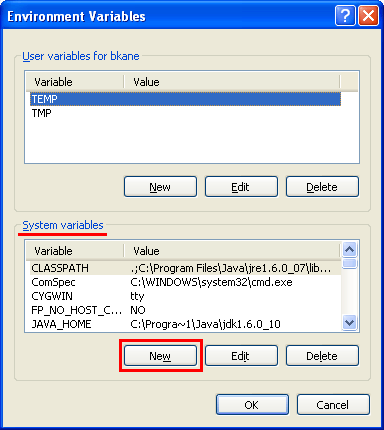
  • In the bottom half of the screen are the 'System variables'. Select the option for 'New' as shown below:
ka0PW0000000rFdYAI_0EM440000002BWx.png
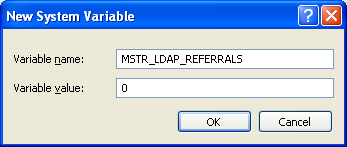
  • In the 'Name' field, input the name of the environment variable to be set. In this case, MSTR_LDAP_REFERRALS.
  • For the value, enter '0' to disable chasing referrals as shown in the image below:
ka0PW0000000rFdYAI_0EM440000002BX0.png
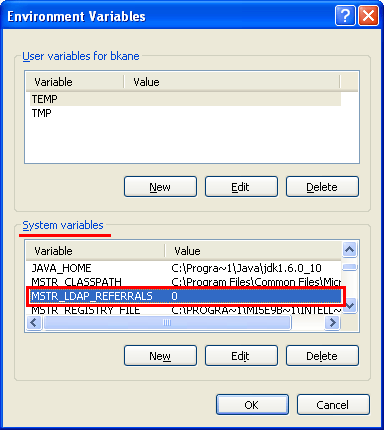
  • Click OK and notice the new system variable in the existing window, as shown below:
  • Restart the Strategy Intelligence Server for the changes to take effect.

In a Unix / Linux environment, users must follow the steps below to set this environment variable:
 

  1. Locate the LDAP.sh file, found in the /StrategyROOT/env directory.
  2. Add write privileges to the file with the following command:
    chmod u+w LDAP.sh
  3. Open and edit this file using a text editor.
  4. Edit the value for the MSTR_LDAP_REFERRALS variable as shown in the excerpt below :
    # Environment variable for LDAP chase referral: 0 to ignore chase referrals, 1 to follow chase referrals
    MSTR_LDAP_REFERRALS=0
    export MSTR_LDAP_REFERRALS
  5. Save and close the LDAP.sh file.
  6. Restart the Strategy Intelligence Server for the changes to take effect.

To activate this functionality in Strategy 2021 Update 7 and above this is controlled via Strategy Workstation.

  1. Connect to the target Environment
  2. Right-click and access 'Directory Service' > 'Configure Directory Service'
  3. Change to the Advanced page
  4. For the configuration 'Allow LDAP Referral Chasing in search' set to disabled as shown below
ka0PW0000000rFdYAI_0EMPW0000044CQ5.jpeg

Comment

0 comments

Details

Knowledge Article

Published:

June 6, 2017

Last Updated:

February 26, 2024