EducationSoftwareStrategy.com
StrategyCommunity

Knowledge Base

Product

Community

Knowledge Base

TopicsBrowse ArticlesDeveloper Zone

Product

Download SoftwareProduct DocumentationSecurity Hub

Education

Tutorial VideosSolution GalleryEducation courses

Community

GuidelinesGrandmastersEvents
x_social-icon_white.svglinkedin_social-icon_white.svg
Strategy logoCommunity

© Strategy Inc. All Rights Reserved.

LegalTerms of UsePrivacy Policy
  1. Home
  2. Topics

KB15671: When sending a Report Services document through MicroStrategy Narrowcast Server, a red X appears in the place of an image


Community Admin

• Strategy


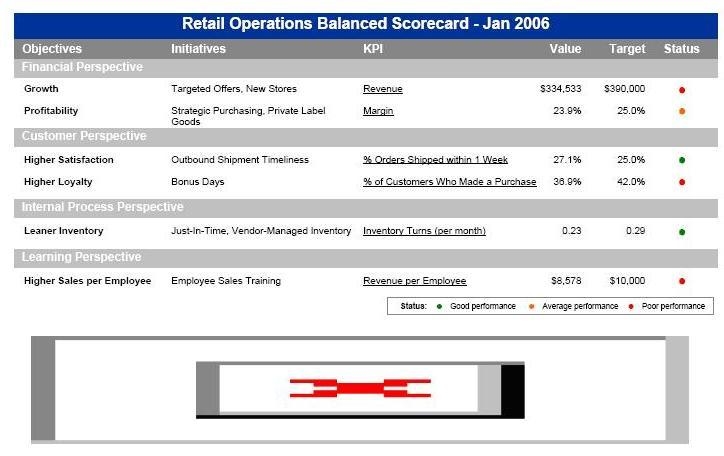
When sending a Report Services document to PDF or Excel that contains an image through Microstrategy Narrowcast Server, a red X is displayed in place of the image.

SYMPTOM:
When sending a Report Services document to PDF or Excel that contains an image through Strategy Narrowcast Server, a red X is displayed in place of the image, as shown below in the PDF example:
ka04W000000Oh5lQAC_0EM440000002BXE.jpeg

The Report Services document executes correctly in Strategy Developer.
 
CAUSE:
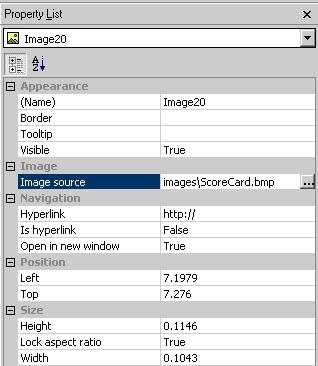
The image is using a relative path such as 'images\ScoreCard.bmp' as viewed in the Property List:
ka04W000000Oh5lQAC_0EM440000002BXF.jpeg

 
ACTION:
Use %%SYSTEMROOT%%\system32\ on the Strategy Narrowcast Server machine. This is the default path of the account connecting to Strategy Intelligence Server from Strategy Narrowcast Server (MCISM7.exe) spawned by the Execution Engine. For Windows 64-bit environments, the correct path is %%SYSTEMROOT%%\Syswow64\.
 
Using the example shown above, an images folder should be created in %%SYSTEMROOT%%\system32\ and the image (ScoreCard.bmp) should be placed in this newly created folder.


Comment

0 comments

Details

Knowledge Article

Published:

June 2, 2017

Last Updated:

June 2, 2017