EducationSoftwareStrategy.com
StrategyCommunity

Knowledge Base

Product

Community

Knowledge Base

TopicsBrowse ArticlesDeveloper Zone

Product

Download SoftwareProduct DocumentationSecurity Hub

Education

Tutorial VideosSolution GalleryEducation courses

Community

GuidelinesGrandmastersEvents
x_social-icon_white.svglinkedin_social-icon_white.svg
Strategy logoCommunity

© Strategy Inc. All Rights Reserved.

LegalTerms of UsePrivacy Policy
  1. Home
  2. Topics

KB15716: After setting the maximum number of rows to be returned, this setting is not applied in Microstrategy Developer 10.x


Stefan Zepeda

Salesforce Solutions Architect • Strategy


After setting a value for the maximum number of rows in Microstrategy Developer 10.x, this value is not taken into account

SYMPTOM:
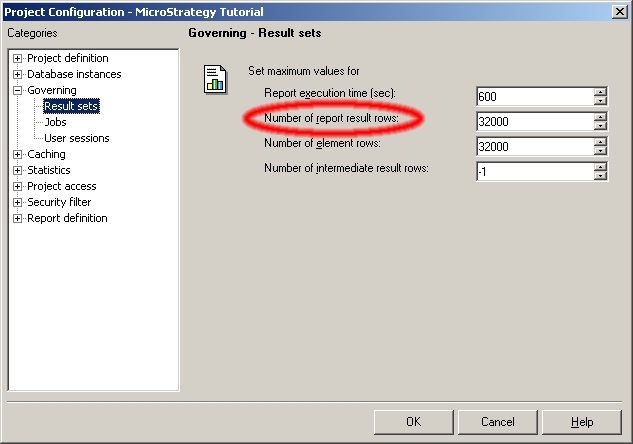
After setting a value for the maximum number of rows in Strategy Developer 10.x, this value is not taken into account, as shown below:
ka02R000000kbb9QAA_0EM440000002FHj.jpeg

The expected behavior when executing a report that exceeds the setting maximum number of rows is an error displaying the following message:


Error: SQL Generation Complete
QueryEngine encountered error: The report result cannot be displayed because it exceeds the maximum row limit in governing: 20 , it is set for report Electronics Revenue by Region
Error in Process method of Component: QueryEngineServer, Project Strategy Tutorial, Job 88, Error Code= -2147205488


Instead the number of rows returned is that specified in the 'Number Of Report Result rows' setting.
 
CAUSE:
The ODBC being used does not support the parameter 'Max Rows Setting.'
The ODBC being used to connect to the Data Warehouse is not supported or not supplied by Strategy.
 
ACTION:
Use the certified ODBC drivers supplied by Strategy or contact Strategy Technical Support to ensure that the ODBC drivers in the installation are supported by Strategy.


Comment

0 comments

Details

Knowledge Article

Published:

June 13, 2017

Last Updated:

June 13, 2017