EducationSoftwareStrategy.com
StrategyCommunity

Knowledge Base

Product

Community

Knowledge Base

TopicsBrowse ArticlesDeveloper Zone

Product

Download SoftwareProduct DocumentationSecurity Hub

Education

Tutorial VideosSolution GalleryEducation courses

Community

GuidelinesGrandmastersEvents
x_social-icon_white.svglinkedin_social-icon_white.svg
Strategy logoCommunity

© Strategy Inc. All Rights Reserved.

LegalTerms of UsePrivacy Policy
  1. Home
  2. Topics

KB15727: MicroStrategy License Manager shows User Privileges in the language of the Windows System Default Locale in MicroStrategy 9.x and newer


Community Admin

• Strategy


MicroStrategy License Manager shows User Privileges in the language of the Windows System Default Locale in MicroStrategy 9.x and newer

SYMPTOM:
Strategy License Manager shows User Privileges in the language of the Windows System Default Locale in Strategy 9.x and newer.
 
STEPS TO REPRODUCE:
Follow the steps below to reproduce this issue:
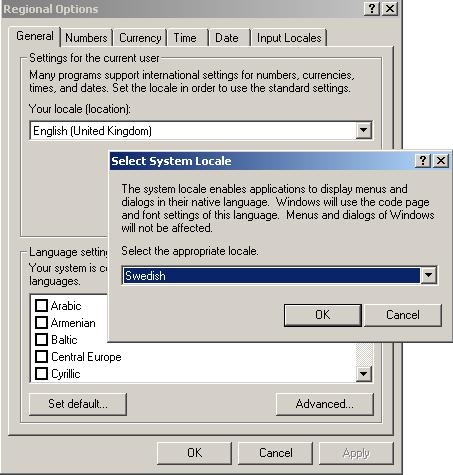
 

  • In Microsoft Windows, go to Control Panel > Regional Options > Set Default.
  • Select a language other than English for the 'System Locale' while retaining English for 'Your Locale' as shown below:
ka04W000000OegpQAC_0EM440000002HWd.jpeg
  • Apply the change and reboot the machine.
  • Open Strategy License Manager and go to the Audit tab.
  • Connect to a 3-tier project source.
  • Select the Everyone group and click Audit.
  • Expand any user in the right-hand panel to view licences.
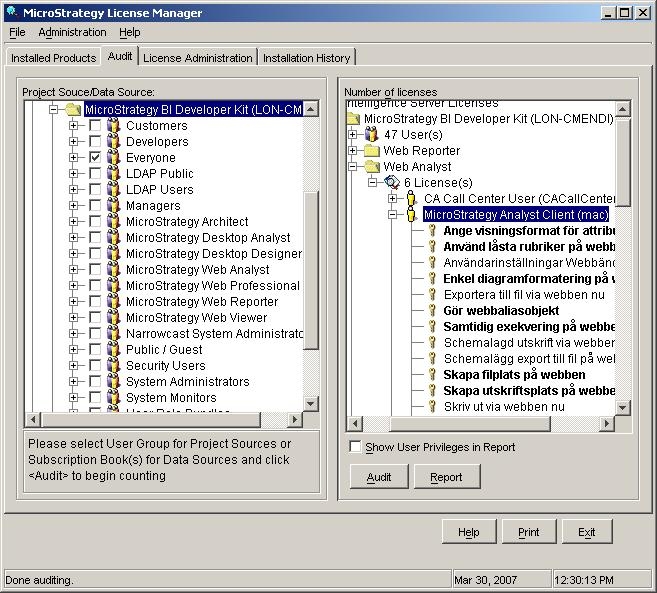
  • Observe that the licence descriptions are not in English but are in the language of the System Locale, as shown below:
ka04W000000OegpQAC_0EM440000002HWf.jpeg

CAUSE:
This is a known issue in Strategy 9.x
 
ACTION:
Currently this issue is still being reviewed for feasibility by our Technology team and is not scoped for any upcoming scheduled Strategy release.


Comment

0 comments

Details

Knowledge Article

Published:

June 7, 2017

Last Updated:

June 7, 2017