EducationSoftwareStrategy.com
StrategyCommunity

Knowledge Base

Product

Community

Knowledge Base

TopicsBrowse ArticlesDeveloper Zone

Product

Download SoftwareProduct DocumentationSecurity Hub

Education

Tutorial VideosSolution GalleryEducation courses

Community

GuidelinesGrandmastersEvents
x_social-icon_white.svglinkedin_social-icon_white.svg
Strategy logoCommunity

© Strategy Inc. All Rights Reserved.

LegalTerms of UsePrivacy Policy
  1. Home
  2. Topics

KB15759: How to create a service that sends a dashboard document as an attachment or saved file in MicroStrategy Narrowcast 9.x


Community Admin

• Strategy


In Strategy Narrowcast Server 9.x, it is possible to send a Flash dashboard document as an attachment. This is also applicable when using the File ITM. The service must be configured by following the steps below:
 

  • Create a new service using the Email (SMTP) ITM or the File ITM.
  • In the Message content section, click the option 'Define Attachments' or 'Define Saved Documents' respectively.
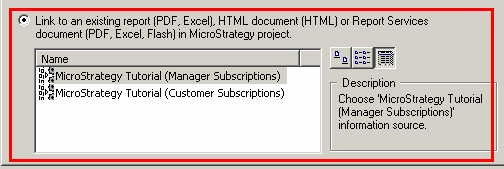
  • Select 'Link to an existing Report or Report Services Document' option, as shown below:
ka04W000000OgoqQAC_0EM440000002BWo.jpeg
  • Select the desired Dashboard document and make sure to select Flash Attachment (.mht) as the document format type, as shown below:
ka04W000000OgoqQAC_0EM440000002BWp.jpeg
  • Click Ok and finish configuring the service as a regular one.

After the service runs, the recipient will receive an .mht file containing the dashboard document. The file will be opened in Microsoft Internet Explorer and it should look as follows:
 

ka04W000000OgoqQAC_0EM440000002BWc.jpeg

 
A Dashboard document could also be sent as part of the email message body. For more information about this refer to the following technote:
 
KB15757 (KB6200-810-1656): How to create a service that sends a Dashboard document in the email message body in Strategy Narrowcast Server 9.x


Comment

0 comments

Details

Knowledge Article

Published:

June 8, 2017

Last Updated:

June 8, 2017