When troubleshooting issues with XML for Analysis (XMLA) connectivity, it may be necessary to examine the HTTP requests submitted by Strategy Intelligence Server to the data source's XMLA provider. In most cases, this information may be obtained by enabling the Strategy diagnostic log XMLA > Verbose Info.
It is possible, though unlikely, to have a discrepancy between the request submitted and that actually transmitted across the network. In that case, it is helpful to use a third-party utility to log the HTTP traffic. One such utility is TCPTrace from pocketSOAP. TCPTrace may be downloaded from the following location:
ttp://www.pocketsoap.com/tcptrace/
How it works
TCPTrace is not a packet sniffer. It captures only HTTP traffic going to and from a specific port on a specific machine; so, unlike network tracing, the amount of traffic captured is significantly less, and is targeted to the issue at hand.
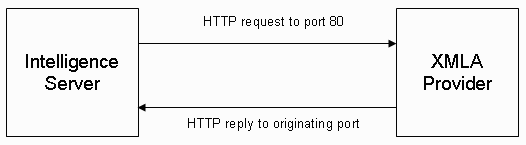
In XMLA communication, Strategy Intelligence Server sends HTTP requests directly to the XMLA provider on the port specified in the Web application server hosting the provider, as shown below:
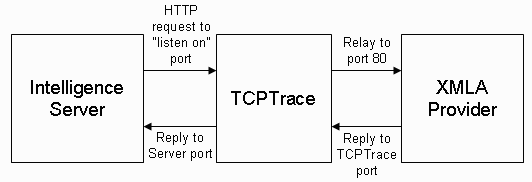
TCPTrace intercepts the traffic on a different port, and relays it to the XMLA provider on the correct port, as shown below:
Configuring TCPTrace
TCPTrace has only a few configuration parameters, as shown below:
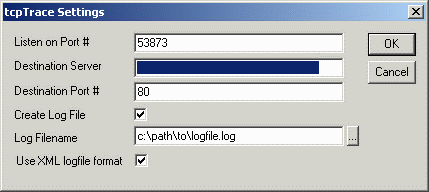
After clicking OK, TCPTrace will start monitoring traffic.
To capture XMLA traffic from Strategy Intelligence Server, it is necessary to modify the database connection object used by the XMLA database instance to point to the TCPTrace machine and "Listen on" port number. If this is not done, the HTTP traffic will be sent directly to the Web server, bypassing TCPTrace; in that case, nothing will be logged.
To configure the database instance to relay traffic through TCPTrace, perform the following steps:
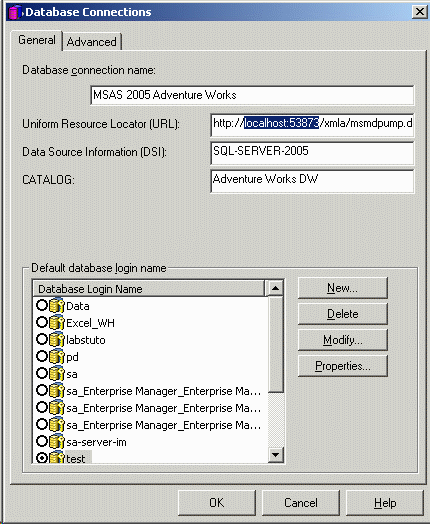
Strategy should now be able to communicate with the XMLA provider with no difference in behavior. The HTTP traffic should be visible in the TCPTrace window. If so, the user may proceed to reproduce the issue under investigation.
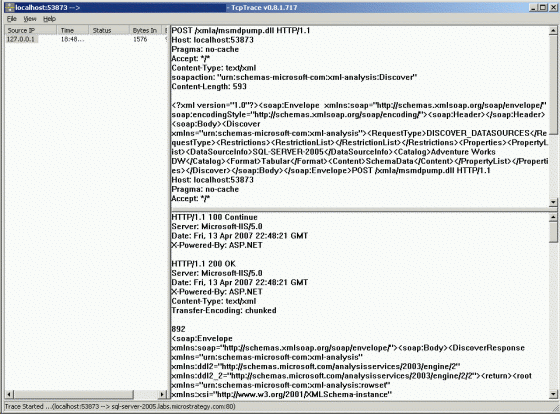
When the test is complete, be sure to return the database connection object in Strategy to its original state, so that it will again send traffic directly to the XMLA provider.
NOTE: The TCPTrace log file is written only periodically as its logging buffer fills. The file may remain empty until the trace is terminated.
