EducationSoftwareStrategy.com
StrategyCommunity

Knowledge Base

Product

Community

Knowledge Base

TopicsBrowse ArticlesDeveloper Zone

Product

Download SoftwareProduct DocumentationSecurity Hub

Education

Tutorial VideosSolution GalleryEducation courses

Community

GuidelinesGrandmastersEvents
x_social-icon_white.svglinkedin_social-icon_white.svg
Strategy logoCommunity

© Strategy Inc. All Rights Reserved.

LegalTerms of UsePrivacy Policy
  1. Home
  2. Topics

KB15805: How to change the port that Tomcat uses when running MicroStrategy Web


Community Admin

• Strategy


By default, Tomcat uses the port 8080 to run MicroStrategy Web applications. However, occasionally users may have a port conflict and will need to change the port that Tomcat uses.

By default, Tomcat uses the port 8080 to run Strategy Webapplications. However, occasionally users may have a port conflict and will need to change the port that Tomcat uses. To change the port number, follow the steps below:
 

  • Shutdown the Tomcat application server.
  • In the Tomcat installation folder, open the Conf directory.
  • Create a backup of the server.xml file.
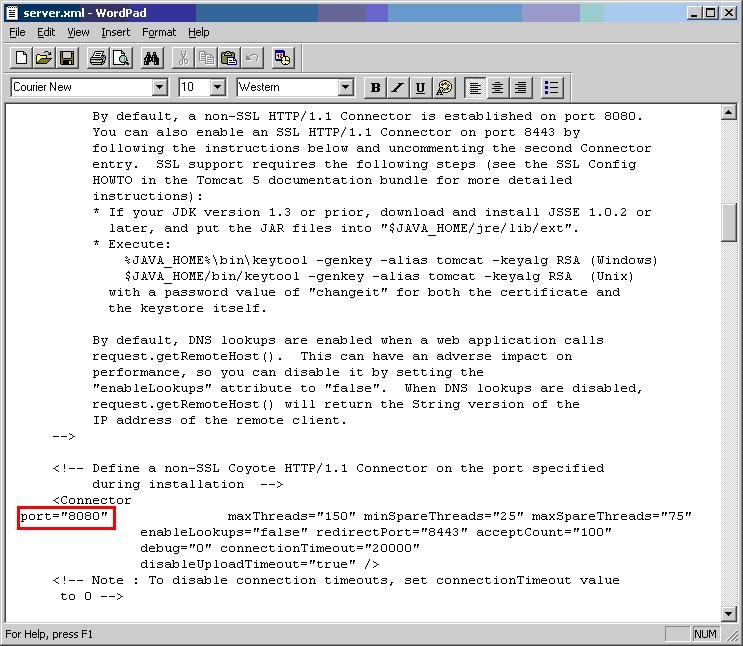
  • Modify the original server.xml file and search for '8080'. Look for the following section of code:
ka0PW00000010E5YAI_0EM4400000028n8.jpeg
  •  
    <Connector
    port="8080" maxThreads="150" minSpareThreads="25" maxSpareThreads="75"
    enableLookups="false" redirectPort="8443" acceptCount="100"
    debug="0" connectionTimeout="20000"
    disableUploadTimeout="true" />
  • Modify the value of the port parameter to the desired value.
  • Save and close the server.xml file.
  • Start the Tomcat Application Server.
  • Access Strategy Web Universal 9.x with the new port number in the URL:
    http://MACHINENAME:PORT_NUMBER/MicroStrategy/servlet/mstrWeb

 
Third Party Software Installation WARNING
The third-party product(s) discussed in this technical note is manufactured by vendors independent of Strategy. Strategy makes no warranty, express, implied or otherwise, regarding this product, including its performance or reliability.


Comment

0 comments

Details

Knowledge Article

Published:

June 22, 2017

Last Updated:

February 27, 2024