SYMPTOM:
When attempting to establish a connection to a SAP BW data source using JCo 2.x connector files from Strategy Intelligence Server Universal 9.x, the following error appears:
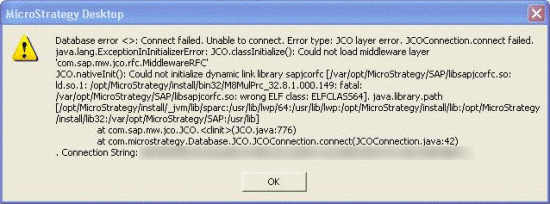
Database error <>: connect failed. Unable to connect. Error type: JCO layer error. JCOConnection.connect failed. java.lang.ExceptionInInitializerError: JCO.classInitialize(): Could not load middleware layer 'com.sap.bw.jco.rfc.MiddlewareRFC'
JCO.nativeInit():Could not initialize dynamic link library sapjcorfc .
...
CAUSE:
This issue occurs if the 64-bit version of the SAP libraries is installed on the UNIX machine.
SAP connectivity using JCo 2.x connector files in Strategy Intelligence Server Universal 9.x requires three library files to be downloaded from SAP and stored in a location on the Strategy Intelligence Server machine that is accessible by the Strategy Intelligence Server application. For AIX, the files are:
NOTE: The file extensions may differ in different UNIX platforms.
While Strategy Intelligence Server Universal is a 64-bit executable, the process that handles communication with all data sources, M8MulPrc_32, is a 32-bit executable. Consequently, any dynamically loaded library that uses must also be 32-bit.
In the error message, ELFCLASS64 indicates that a 64-bit library is being loaded.
The command 'objdump -a' can be used to check if the connector files are 32-bit or 64-bit. If a file is 32-bit, the output of the command is as shown below:
Sample Code/Error
objdump -a libsapjcorfc.so
libsapjcorfc.so: file format aixcoff-rs6000
If a file is 64-bit, the output will be as below (note the 64 in the fileformat output):
Sample Code/Error
objdump -a libsapjcorfc.so
libsapjcorfc.so: file format aixcoff64-rs6000
ACTION:
System administrators should take care to download the appropriate 32-bit Java connector package from the SAP Service Marketplace.
For additional details on configuring Strategy Intelligence Server Universal 9.x for connectivity to SAP BW using JCo 2.x connector files, consult the following Strategy Knowledge Base technical note:
TN13302 (KB5300-802-0734) - How to set up SAP BW connectivity with Strategy Intelligence Server Universal 9.x, using JCo 2.x connectors.
Refer to the following Strategy Knowledge Base document for information on recommended JCo connector files.
KB37481: How to determine which Java Connector (JCo) to use to connect Strategy Intelligence Server to SAP BW data source?
