EducationSoftwareStrategy.com
StrategyCommunity

Knowledge Base

Product

Community

Knowledge Base

TopicsBrowse ArticlesDeveloper Zone

Product

Download SoftwareProduct DocumentationSecurity Hub

Education

Tutorial VideosSolution GalleryEducation courses

Community

GuidelinesGrandmastersEvents
x_social-icon_white.svglinkedin_social-icon_white.svg
Strategy logoCommunity

© Strategy Inc. All Rights Reserved.

LegalTerms of UsePrivacy Policy
  1. Home
  2. Topics

KB15836: 'An error occurred while attempting to send a message to ‘##User name##’' error occurs when trying to SEND MESSAGE with MicroStrategy Command Manager


Stefan Zepeda

Salesforce Solutions Architect • Strategy


This article notes a possible cause for issue with the send message script

SYMPTOM:
 
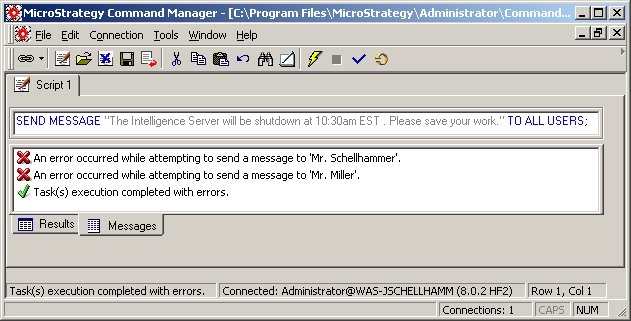
Consider an example where an Administrator wants to notify current Strategy Developer users that the Strategy Intelligence Server will be restarted at a specific time. The Administrator writes the following script and executes it through Strategy Command Manager:
 
SEND MESSAGE "The Intelligence Server will be shutdown at 10:30am EST . Please save your work." TO ALL USERS;
However, after doing so, for some of the users, the Administrator receives error messages, as shown below:
 

ka02R000000kbuLQAQ_0EM440000002FFK.jpeg

 
CAUSE:
 
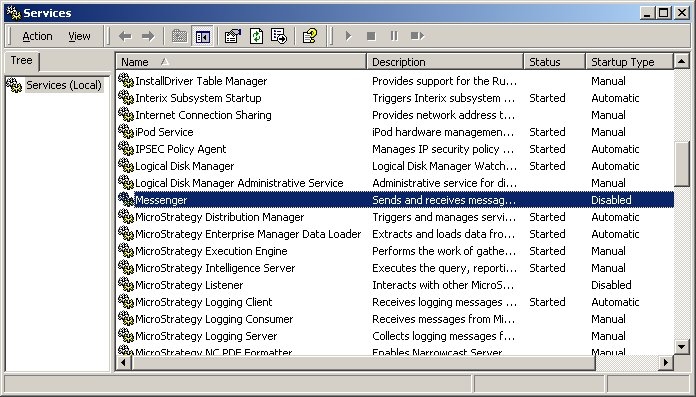
For messages to be sent to Strategy Developer users, the Messenger service on their individual machines must be started. For these two users above, their services were disabled, as shown below:
 

ka02R000000kbuLQAQ_0EM440000002FFT.jpeg

 
ACTION:
 
Enable and start the Messenger service on all of the client machines that the user wishes to have messages sent to, as shown below:
 

ka02R000000kbuLQAQ_0EM440000002FFV.jpeg


Comment

0 comments

Details

Knowledge Article

Published:

June 6, 2017

Last Updated:

June 6, 2017