EducationSoftwareStrategy.com
StrategyCommunity

Knowledge Base

Product

Community

Knowledge Base

TopicsBrowse ArticlesDeveloper Zone

Product

Download SoftwareProduct DocumentationSecurity Hub

Education

Tutorial VideosSolution GalleryEducation courses

Community

GuidelinesGrandmastersEvents
x_social-icon_white.svglinkedin_social-icon_white.svg
Strategy logoCommunity

© Strategy Inc. All Rights Reserved.

LegalTerms of UsePrivacy Policy
  1. Home
  2. Topics

KB15898: Differences between a Blank Dashboard and a Blank Document in MicroStrategy Desktop and Web 8.1.x


Stefan Zepeda

Salesforce Solutions Architect • Strategy


This technical note describes why you would choose blank dashboard over a blank document in MicroStrategy Web and MicroStrategy Desktop.

Starting in Strategy Desktop and Web 8.1.x, when a user creates a new document, the user has a new option to create a Blank Dashboard. This feature is also available in 10.7 (Note: Pictures may be outdated).The illustrations below show how the interface looks in both applications:


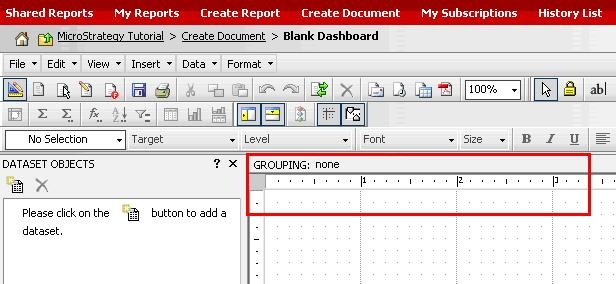
A blank Dashboard is similar to a regular Report Services document, but it includes some settings that are already predefined in order to take advantage of the widget creation. These settings are:
 

  • The Blank dashboard is already enabled for Flash view mode. By default, a Blank Document is not enabled for Flash, but the user can manually enable it under the Format menu and Document properties, as shown below:
ka02R000000kcgMQAQ_0EM440000002FFm.jpeg
  • The dashboard page is formatted to one page and extra Headers and Footers have been removed, as shown below:
ka02R000000kcgMQAQ_0EM440000002FFi.jpeg

Comment

0 comments

Details

Knowledge Article

Published:

April 4, 2017

Last Updated:

April 4, 2017