EducationSoftwareStrategy.com
StrategyCommunity

Knowledge Base

Product

Community

Knowledge Base

TopicsBrowse ArticlesDeveloper Zone

Product

Download SoftwareProduct DocumentationSecurity Hub

Education

Tutorial VideosSolution GalleryEducation courses

Community

GuidelinesGrandmastersEvents
x_social-icon_white.svglinkedin_social-icon_white.svg
Strategy logoCommunity

© Strategy Inc. All Rights Reserved.

LegalTerms of UsePrivacy Policy
  1. Home
  2. Topics

KB15978: How to apply an 'Insert Post String' statement after every pass of SQL in a MicroStrategy Developer 10.x report to avoid intra-query parallelism conditions on a SQL Server database


Stefan Zepeda

Salesforce Solutions Architect • Strategy


How to apply an 'Insert Post String' statement after every pass of SQL in a MicroStrategy Developer 10.x report to avoid intra-query parallelism conditions on a SQL Server database

Some report executions against a SQL Server database might return an error like the following:
Intra-query parallelism caused your server command (process ID #51) to deadlock
An 'Insert Post String' statement such as OPTION (MERGE JOIN, LOOP JOIN) may need to be included after every pass of SQL to optimize the execution, avoid the error message, and complete the task. These strings are also known as SQL Hints.
 
The following procedure explains how to apply a SQL hint string after every pass of SQL in a Strategy Desktop 8.x report needing intra-query parallelism functionality for a SQL Server database:
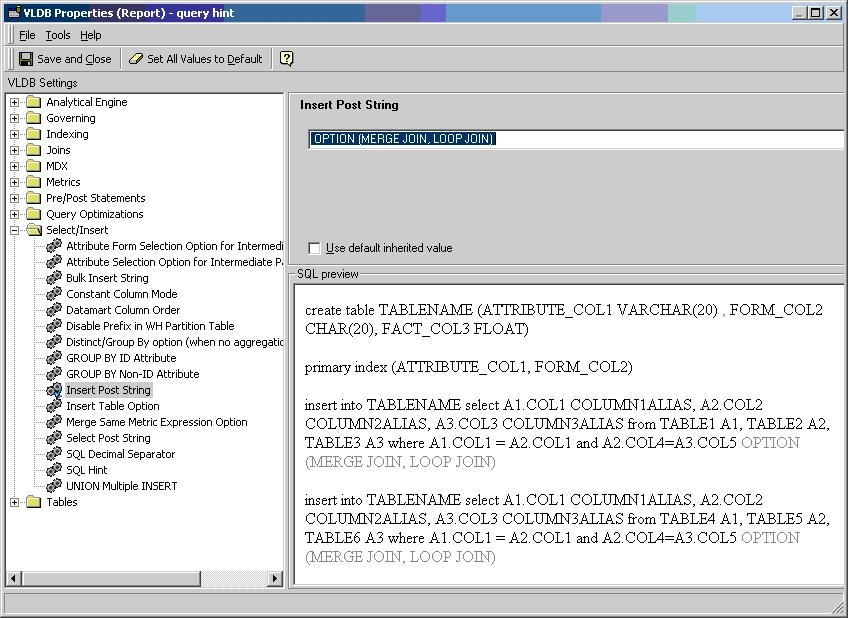
 

  • Open the VLDB properties window and select the Insert Post String option under the Select/Insert category.
  • Uncheck the 'Use default inherited value' box to be able to type down a SQL hint, which will be inserted after every pass of SQL in the report. In this example, the 'OPTION (MERGE JOIN, LOOP JOIN)' SQL hint is used, as illustrated below:
ka02R000000kbyfQAA_0EM440000002BUq.jpeg
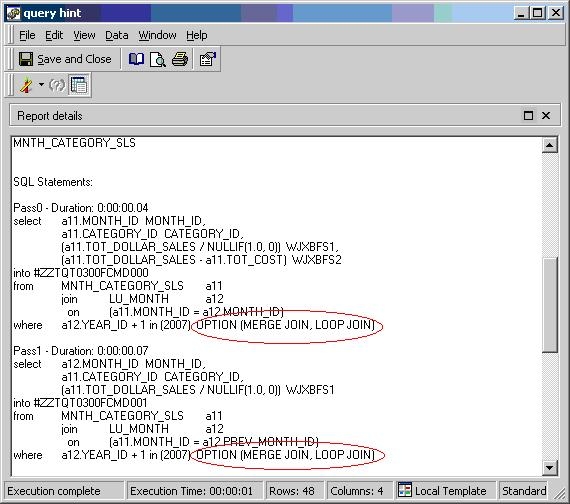
  • Once the report is executed in SQL view, this SQL hint string will be included after every pass of the SQL generation, as shown below:
ka02R000000kbyfQAA_0EM440000002BV4.jpeg

For more details on this type of error due to Intra-query parallelism, refer to the following Strategy Knowledge Base technical note:
 
KB14316: ‘Intra-query parallelism caused your server command (process ID #51) to deadlock’ error occurs while executing a report when using multi-processor SQL Server as a warehouse


Comment

0 comments

Details

Knowledge Article

Published:

June 4, 2017

Last Updated:

June 4, 2017