EducationSoftwareStrategy.com
StrategyCommunity

Knowledge Base

Product

Community

Knowledge Base

TopicsBrowse ArticlesDeveloper Zone

Product

Download SoftwareProduct DocumentationSecurity Hub

Education

Tutorial VideosSolution GalleryEducation courses

Community

GuidelinesGrandmastersEvents
x_social-icon_white.svglinkedin_social-icon_white.svg
Strategy logoCommunity

© Strategy Inc. All Rights Reserved.

LegalTerms of UsePrivacy Policy
  1. Home
  2. Topics

KB16053: The ‘Body’ section is renamed to ‘Detail Header’ after modifying the display of sections in a dashboard in MicroStrategy Web


Community Admin

• Strategy


The ‘Body’ section is renamed to ‘Detail Header’ after modifying the display of sections in a dashboard in MicroStrategy Web

SYMPTOM:
The 'Body' section is renamed to 'Detail Header' after modifying the display of sections in a dashboard in Strategy Web.
 
STEPS TO REPRODUCE:
Follow the steps below to reproduce this issue:
 

  • Create a new blank dashboard by going to 'Create Document' on the Shortcuts toolbar and select 'Blank Dashboard'.
  • Go to View > Sections and notice how 'Body' is the only section checked, as shown below:
ka04W000000OghBQAS_0EM4400000028m7.jpeg
  • Check 'Page Header' then uncheck 'Body and click 'OK'.
  • Go to View > Sections.
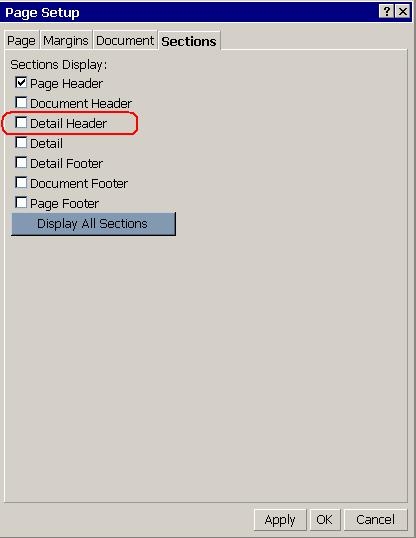
  • Notice how 'Body' is no longer a section, as shown below:
ka04W000000OghBQAS_0EM4400000028mC.jpeg
  •  
    It has been replaced by 'Detail Header'.
     

CAUSE:
The term Body is used when both the "Detail" and "Detail Footer" sections are hidden whereas the term "Detail Header" will be shown when the "Detail" or "Detail Footer" sections are visible.
They basically refer to the same section and this is working as designed.


Comment

0 comments

Details

Knowledge Article

Published:

June 13, 2017

Last Updated:

June 13, 2017