In Strategy, users can create compound metrics belonging to MDX Cubes imported from multidimensional data sources such as SAP BW, Microsoft Analysis Services, or Hyperion Essbase. For details on this feature, refer to the following Strategy Knowledge Base article.
KB15870: How to create Compound metrics for OLAP Cube data sources in Strategy
This functionality also includes the ability to pass multidimensional expression (MDX) syntax directly to the MDX Cube data source. The custom syntax will be placed into a WITH MEMBER clause defining a member of the Measures collection for the scope of the query.
Any expressions that are valid in a WITH MEMBER clause may be used here, allowing metrics built in Strategy to leverage the data manipulation capabilities of the MDX Cube data source. Some of these features may be used to create metrics that behave somewhat like dimensional, conditional, and transformation metrics in Strategy ROLAP reports.
Strategy Usage
In the MDX Cube compound metric editor, a formula enclosed in double quote marks will be treated as a passthrough formula, as illustrated below:
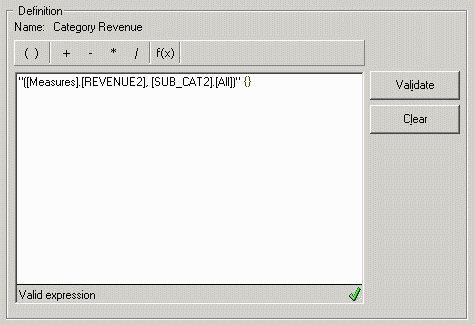
When this metric is used in a report, MDX will be generated as follows:
with set [dim0_select_members] as '{[CATEGORY2].[LEVEL01].members}'
set [dim1_select_members] as '{[SUB_CAT2].[LEVEL01].members}'
member [Measures].[FreeForm_0] as '([Measures].[REVENUE2], [SUB_CAT2].[All])'
select {[Measures].[45FQHOI4TISN7TMK0B89GNYW4], [Measures].[FreeForm_0]} on columns,
non empty CROSSJOIN([dim0_select_members], [dim1_select_members]) on rows
from [QE_HIER_2/HJHQHIER]
ApplySimple may also be used to handle prompts and other objects dragged in from the object browser. The ApplySimple function is used exactly as in SQL reports, with the passthrough syntax enclosed in double quote marks, followed by a list of Strategy objects or expressions separated by commas, for example:
ApplySimple("sum({#0}, [Measures].[REVENUE2])", ?[Choose from all elements of 'Region Level 01'.])
Note that objects in the MDX Cube should be given using the database's identifier. For SAP BW, the technical name should be used. Alternately, use ApplySimple and embed the compound metrics using #0, #1... placeholders.
ApplySimple("(#0, [SUB_CAT2].[All])", Revenue)
ApplySimple("sum({#0}, #1)", ?[Choose from all elements of 'Region Level 01'.], Revenue)
It is the user's responsibility to ensure that the MDX syntax is correct, and that it accurately reflects the desired calculation. Some suggested MDX formulas may be found in the following Strategy Knowledge Base articles, along with restrictions and proper usage scenarios.
Note:
These techniques are not equivalent to dimensional, conditional and transformation metrics in normal SQL reports, due to inherent differences between the SQL and MDX query languages. The aforementioned articles explain these differences in more detail.
Be aware that MDX is very strict about the inclusion or exclusion of dimensions, hierarchies and attributes on the report template in conjunction with many of these custom formulas. Some formulas expect related attributes to exist on the template, and they will return incorrect results (or an error) if the attributes are omitted; other formulas will return unexpected results if the attributes are included.
As a result, certain custom MDX formulas may not be appropriate for ad-hoc reporting, unless end-users are well-trained in the proper usage of the metrics.
Certain MDX functions require strings to be enclosed in double quotes, in particular accessing member properties using .Properties("PropertyName") syntax. SAP BW additionally allows back quotes (`) to delimit strings, allowing access to member properties as follows: .Properties(`PropertyName`). However, this usage lies outside of standard MDX and is not supported by Microsoft Analysis Services.
In Strategy, double-quote marks can be entered into custom MDX expressions (or any ApplySimple) by placing two double-quotes in succession. That is, entering the expression "Sum({ Filter({ [Dimension].[Level].Members }, [Dimension].CurrentMember.Properties(""PropertyName"") = ""Value"") }, [Measures].[Revenue])" into the metric editor would translate in MDX into 'Sum({ Filter({ [Dimension].[Level].Members }, [Dimension].CurrentMember.Properties("PropertyName") = "Value") }, [Measures].[Revenue])'.
Strategy Technical Support does not provide customized MDX queries. The syntax in this document can vary depending on the database. Please contact your database administrator to obtain the correct syntax for any desired customized MDX statements.
