Executing Jobs Per User
The 'Executing jobs per user' is a governing setting in Strategy Intelligence Server 9.x which provides the ability to set a maximum number of concurrent jobs a single user account may have executing in the project. The default value for this setting is -1, which indicates that no limit has been defined. A value of 0 functions the same way as the value -1. This setting can be found under Project Configuration > Governing > Jobs, as shown below:
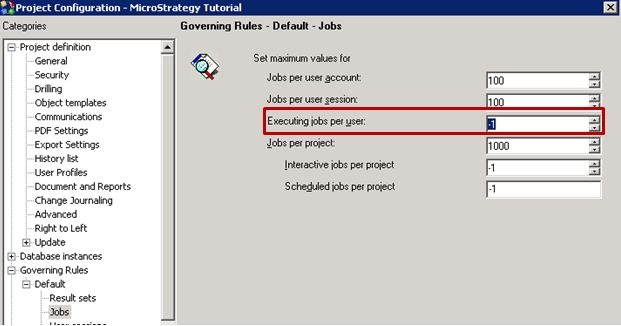
The main purpose of this feature is to limit the number of simultaneously executing jobs per user per project against the warehouse. If the limit is reached for the project, new report requests are placed in the Strategy Intelligence Server 9.x queue until other jobs finish. They are then processed in the order in which they were placed in the queue.
This feature helps manage concurrent workload against the warehouse and also prevents any single user from taking up all the threads and monopolizing the system, thus restricting the memory requirement imposed on the Strategy Intelligence Server 9.x.
When a job is submitted to the Strategy Intelligence Server 9.x, it is handled by a series of Processing Units (PUs). A Processing Unit is a job-queuing and processing station with a collection of tasks that a job will undergo after it is submitted to the Strategy Intelligence Server 9.x. By default, the following PUs are configured for a Server definition:
In the front-end Strategy Desktop 9.x interface, users can configure the number of 'Low', 'Medium' and 'High' priority threads, in the 'Job Prioritization' tab located in Database Instance Manager > Database Instance. In the back end, these threads are translated to the number of threads that will be allocated for each one of the three sub-queues within the 'QueryExecution' PU root queue. Strategy Intelligence Server 9.x handles the creation, prioritization, and allocation of its sub-queues and queues in other PUs internally.
If this setting is left at the default value of -1 or 0, then no governing will be applied to the number of jobs that a user can execute concurrently in any of the PUs.
If this setting is set to a finite non-zero number, then at no time can the number of executing jobs for the user exceed this number is any PU. For instance, if the setting is set to 1 and the user submits five reports at the same time, then at any instance in time, there can be no more than one job executing in any of these PUs. That is, at the same instance of time, there can be one job executing in the 'QueryExecution' PU, one job executing in the 'AnalyticalPU', one job executing in the 'SQLEngine' PU, and so on. But there can never be two or more jobs executing in any of these PUs.
NOTES:
