What is a null value?
A null value is an unknown value. Null values can be found in the data warehouse or they can result from the calculations and cross-tabbing that is performed on a report. For example, a null value in the data warehouse can occur if a customer omits his birth date or another piece of personal information. If a report does not contain data in a particular field and the user pivots attributes, the cross-tabbing may produce a null value.
What can be done about null values being returned for report?
There are three places where null values can be handled. They are:
Project-level and Report-level Null Handling Options
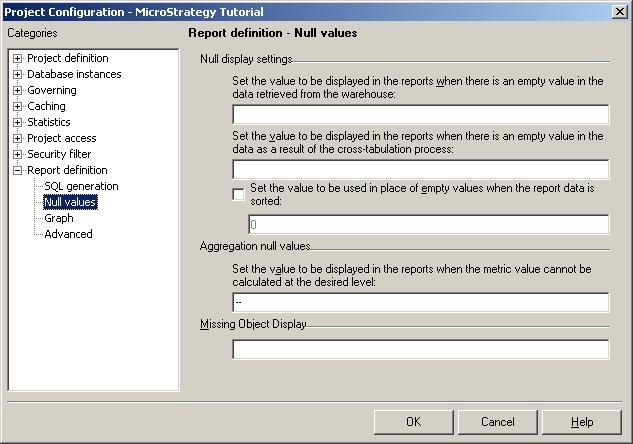
At the Project-level, null handling can be set by going to Project Configuration > Report Definition > Null Values. At the Report-level, null handling can be set by editing the report and then clicking on the toolbar Data > Report Data Options > Display > Null Values. The null handling options available at each level are exactly the same. The only difference is that for each of the three different Null value handling categories shown below, at the Report-level, there are 'Use Default' checkboxes that users can select so that the report will inherently directly from the Project-level what should be used.
Project-level
Report-level
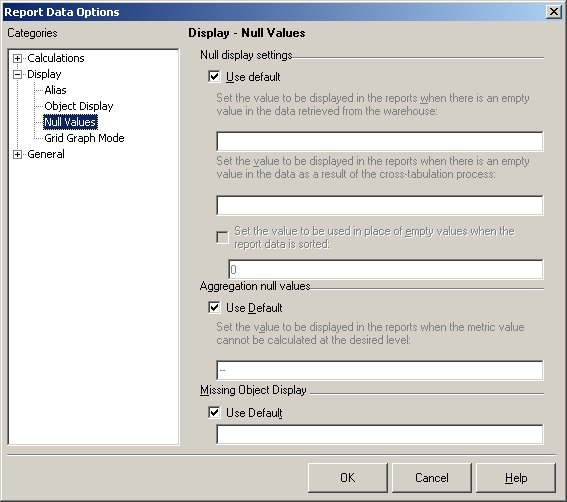
The value entered in the Aggregation null values setting replaces nulls generated during the calculation of the report. These can occur when the metric value cannot be calculated at the selected level.
