MDX provides functions to operate on hierarchy members: for instance, to move to the previous or next member in the same level. Other functions, such as MTD, WTD, or YTD, construct a set over which measures should be aggregated based on time hierarchy designs. These functions can be used to create transformation metrics in Strategy.
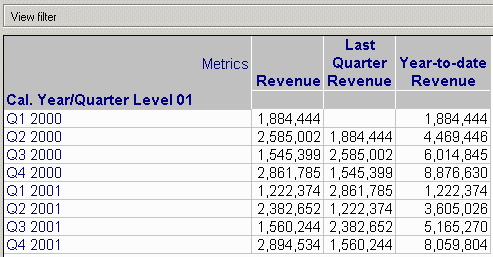
The following report includes a one-to-one transformation to display the previous quarter's revenue, and a many-to-one transformation calculating year-to-date revenue. Note that the year-to-date metric must use the MDX Sum() function, which takes two arguments: the set over which the measures should be aggregated, and the measure itself.
"(., .CurrentMember.Prevmember)"
"sum(YTD(.CurrentMember), .)"
Standard MDX functions that support transformation behavior include:
Note: There may be syntax or implementation differences between OLAP Cube providers. Consult the MDX documentation for the OLAP Cube database platform for details on member and set functions that may be used for transformations.
Note: Whenever a custom MDX metric formula uses the CurrentMember function on a hierarchy, one or more attributes from that hierarchy must be present on the report. If this condition is not met, the metric may return empty values, or the report may fail with an error.
It is valid to include the transformation attribute in the report filter while excluding it from the template, provided that only one element of that attribute is chosen. A report with Category on the template and a month-to-date metric is valid as long as it filters on a single date. Attempting to filter on more than one date in this context is likely to produce an error or incorrect results, because the month-to-date in metric must have a different value for each selected date. Without the date attribute on the template, the report would have to display multiple values in the same cell, which is not possible. If it is necessary to filter on multiple elements, the corresponding attribute must be on the template.
If the attribute in the transformation is not present in either the template or filter, then by definition the transformation cannot apply. This is also true in the Strategy SQL Generation Engine, where transformations are omitted if there is no reference to one of the transformation's member attributes in the report.
For additional details on creating custom MDX metric formulas in Strategy, consult the following Strategy Knowledge Base technical note.
B16057 (KB5200-81x-2345): How to create customized metric expressions for OLAP Cube data sources in Strategy Engine 8.1.0
