Introduction:
Character Set is a set of elements used to represent information such as numbers and characters. For example, the alphabet (a, b, c,..) and number system (0, 1, 2,...) constitute the Character Set for the English language.
Code Page is a set of characters wherein each character is represented by a unique numerical value. For example, the basic ISO8859-1 code page represents the Latin character set. More often than not, the words Character Set and Code page are used inter-changeably by many practitioners.
Database Code Page dictates what characters can be stored in the database and governs the interaction between the database and the ODBC driver.
Oracle
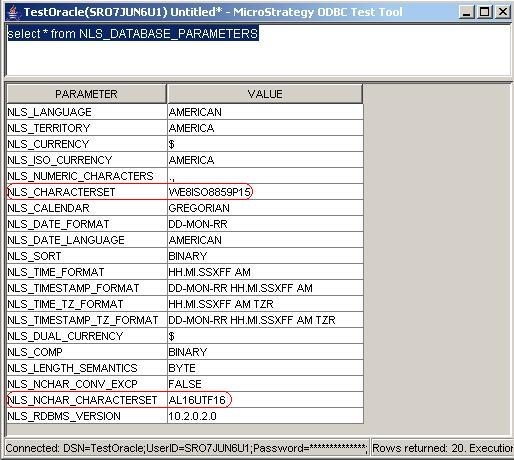
Database character set for Oracle is referred to as character set or charset. To determine the code page on the Oracle database, run the following SQL against the database:
select * from NLS_DATABASE_PARAMETERS
From the table that is returned, check the values for NLS_CHARACTERSET and NLS_NCHAR_CHARACTERSET, as shown below:
Microsoft SQL Server
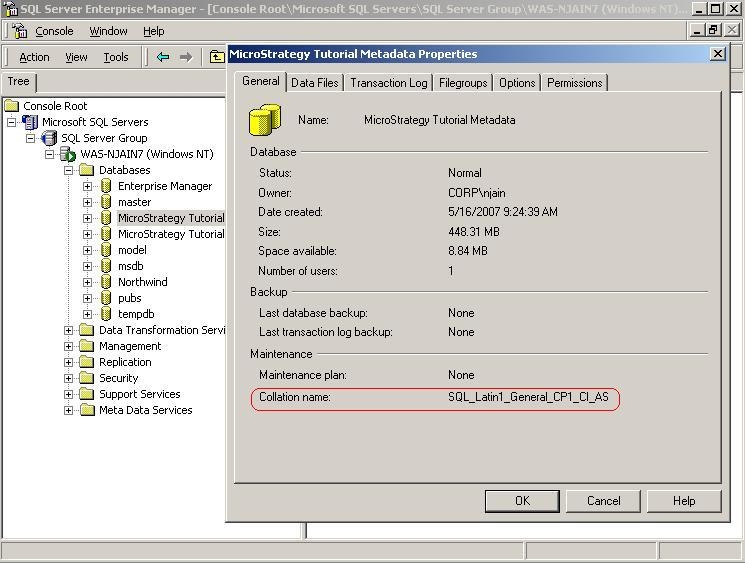
Database character set for Microsoft SQL Server is referred to as code page or collation. When creating a database, the collation type for the database can be specified. Collation/code page for a SQL Server database can be determined by right-clicking on the database and selecting properties as seen in the screenshot below:
Teradata
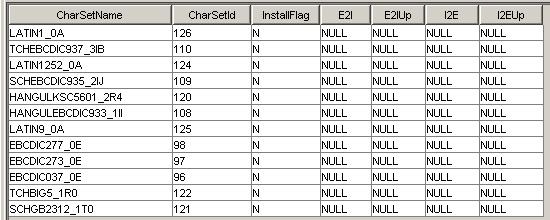
To determine the character set for Teradata database, run the following SQL against the database:
select * from dbc.chartranslations;
From the table that is returned, check the value in the third column, InstallFlag.
Restart the Teradata server to update the list of character sets. In a Teradata command window, enter: tpareset -f reason_for_restart, as shown below:
The source of the above information and addiitonal information on Teradata code sets can be found at the following:
Verifying the character set on the Teradata server
IBM DB2
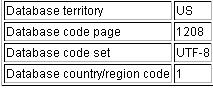
Database character set for IBM DB2 is referred to as code page or code set. To determine the code set for DB2 database, issue the following command resulting in the table below:
db2 get database configuration for <databaseName>
The resulting table will look as follows:
The source of the above information and addiitonal information on DB2 UDB code sets can be found at the following:
DB2 National Language Support
