In Strategy Web, users and administrators can specify the Time Zone preference for time and date display purposes, as shown below:
1. In Strategy Web, Navigate to the Preferences
2. Select "Project Defaults" on the Left-Side Navigation
3. Select 'General'
4. Under the 'Language' section, select the Drop Down option for "Time Zone"
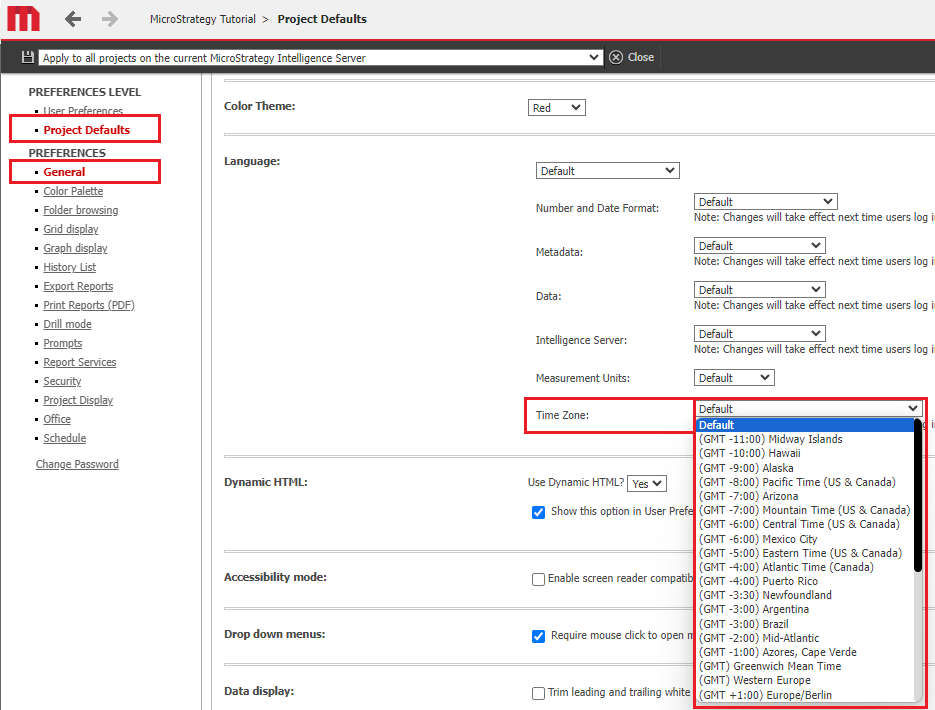
The preference can be set at user or project level and can either take a value (Time Zone) or be set to default.
There are three main components involved in the successful display of creation times for the History List messages in Strategy Web:
1. The Strategy Intelligence Server
2. The Web Server
3. The client browser or PC
(as shown below)
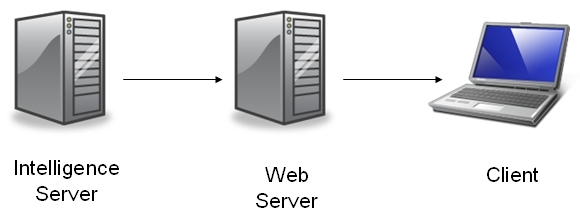
The Strategy Intelligence Server is responsible for creating the History List message and setting the creation time. The creation time for the message in the History List is sent to the Web server in a 'neutral format' using the Greenwich Maritime Time (GMT) to then be transformed to whatever the Time Zone preference is set to.
Consider the following scenario:
Strategy Intelligence Server is set to Eastern Time Zone (GMT -5:00) and a report is sent to the History List at 6:00 p.m. Eastern time.
The Web Server is in Central Time (GMT -6:00).
The client PC is in Canada and has the user Time Zone preference set to Atlantic Time (GMT -4:00).
Case 1 - Web Time Zone preference is set either at the user or project level
As per the above setup, the Web Server requests the message from the History List and receives a 'neutral time' for the message based on the time in GMT format. The Web Server receives the History List message with neutral time of 11:00pm GMT.
The Web Server then translates the time received to the user preference before displaying it. The user preference is set to Atlantic Time (GMT - 4:00), therefore the Web Server displays to the client 7:00pm.
Case 2 - Web Time Zone preference for both user and project are set to default
In this case the above scenario would produce the following output.
The Web Server requests the message from the History List and receives a 'neutral time' for the message based on the time in GMT format. The Web Server receives the History List message with neutral time of 11:00pm GMT.
The Web Server then translates the time received to the local windows Time Zone setting before displaying it. The Web Server machine Time Zone setting is set to Central Time (GMT -6:00) therefore the Web Server displays to the client 5:00 p.m.
