It is possible to use security filters with multidimensional data sources such as SAP BW, Microsoft Analysis Services, and Hyperion Essbase.
Attributes in an OLAP Cube must be mapped to normal project attributes for security filtering to apply. This is because the standalone filter editor allows only normal project objects to be included. OLAP Cube attributes are considered XDA (extended data access) attributes and, as such, are not available for use in the security filter editor.
To apply security filters to OLAP Cubes, first ensure that the filtering attribute from the OLAP Cube is mapped correctly onto the corresponding primary project attribute. It is important that the OLAP Cube data for the ID form match the warehouse IDs precisely.
After establishing the mapping, the security filter should be created based on the normal project attribute. Attribute elements chosen in the security filter editor will be matched to the equivalent data in the OLAP Cube.
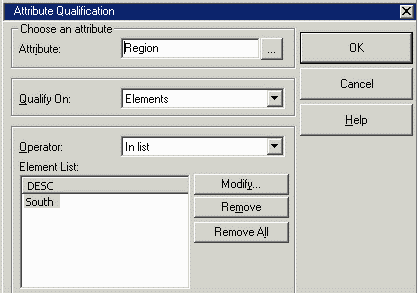
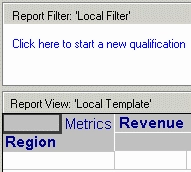
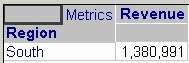
If a user with a security filter on the mapped attribute runs a report against the cube, the security filter is introduced into the MDX statement (even with an empty report filter definition).
Report definition
Report results
with set as 'Filter(..members, . = "5")'
set as '{}'
select {.} on columns,
non empty dimension properties . on rows
from
Security filter considerations
Important: Care must be exercised in report design when using security filters. MDX does not allow filtering at a level lower than report level. That is, if report level is Region, MDX does not support filtering at Call Center level. Therefore, if a user has a security filter based on Call Center, a report that contains Region on the template without also including Call Center will fail to generate MDX. Because of this limitation in OLAP Cube systems in general, it cannot be recommended at present to implement highly granular data security using Strategy security filters. Security filters, whenever possible, should be based on higher-level attributes in their respective hierarchies.
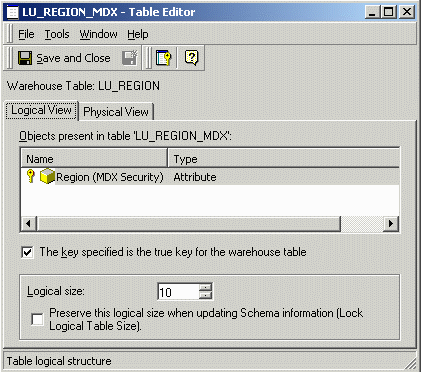
If it is needed to apply security filters to OLAP Cube reports but not data warehouse queries, a table alias should be defined for the project attribute's lookup table, and a separate attribute defined in the project exclusively for use in OLAP Cube security filter qualifications. The normal project attribute may retain its original ID form (which is more efficient for SQL execution), while the separate attribute should be defined only on the lookup table alias and not on any other table in the project. Since the separate attribute is unrelated to any other project attribute and is not mapped to any other fact or lookup tables, qualifications on this attribute will be omitted from SQL reports, but they will be used in OLAP Cube reports, provided that OLAP Cube attributes are mapped to this special attribute.
Following is a table alias defining one such separate attribute.
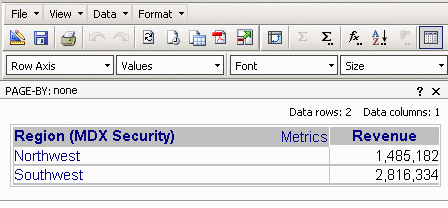
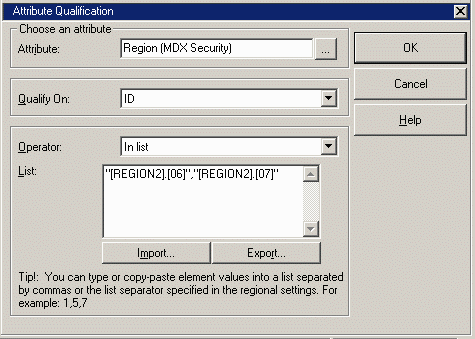
For projects with no regular SQL schema (only OLAP Cube objects), it is currently necessary to create a dummy warehouse with lookup tables for the attributes needed in security filters. It might not be necessary to populate these tables, provided that attribute form qualifications with string literals are used in the security filter. For example, a security filter to include the Northwest and Southwest regions can be defined as follows:
Application of security filters in OLAP Cube reports
As in SQL reports, security filter qualifications will be merged into the report filter. The MDX for the report will include the security filter qualifications.
Typically, attribute qualifications from the same hierarchy are conjoined using OR. This does not apply to security filter qualifications. The MDX Engine will produce one set of hierarchy members for a condition defined in the report filter, another set for the security filter condition, and combine the sets using the Intersect() function.
Report filter qualification
Security filter qualification
Intersection
with set as '{., ., ., .}'
set as '{., .}'
set as 'Intersect(, )'
set as '{}'
set as '{Generate(, Descendants(.CurrentMember, ., SELF_AND_BEFORE))}'
select {.} on columns,
non empty on rows
from