EducationSoftwareStrategy.com
StrategyCommunity

Knowledge Base

Product

Community

Knowledge Base

TopicsBrowse ArticlesDeveloper Zone

Product

Download SoftwareProduct DocumentationSecurity Hub

Education

Tutorial VideosSolution GalleryEducation courses

Community

GuidelinesGrandmastersEvents
x_social-icon_white.svglinkedin_social-icon_white.svg
Strategy logoCommunity

© Strategy Inc. All Rights Reserved.

LegalTerms of UsePrivacy Policy
  1. Home
  2. Topics

KB16157: How to change the location of the Java JDK (JAVA_HOME) that Apache Tomcat uses in MicroStrategy Web Universal


Community Admin

• Strategy


To change the location of the Java Development Kit (JDK) that Apache Tomcat uses, one must set the JAVA_HOME variable that Tomcat reads. There are several ways of setting the JAVA_HOME variable, and the following method is one of these ways.

To change the location of the Java Development Kit (JDK) that Apache Tomcat uses, one must set the JAVA_HOME variable that Tomcat reads. There are several ways of setting the JAVA_HOME variable, and the following method is one of these ways.
 
Note: In Microsoft Windows, some users would prefer to set the JAVA_HOME variable through the System's Environmental Variables. 
 

  • If Tomcat is running under a Unix system, open the catalina.sh file. If Tomcat is running under Windows, open the catalina.bat file.
  • At the beginning of the script (and after the comments), place the JAVA_HOME variable and the location of the JDK that Tomcat will use.
    For example:
     
     
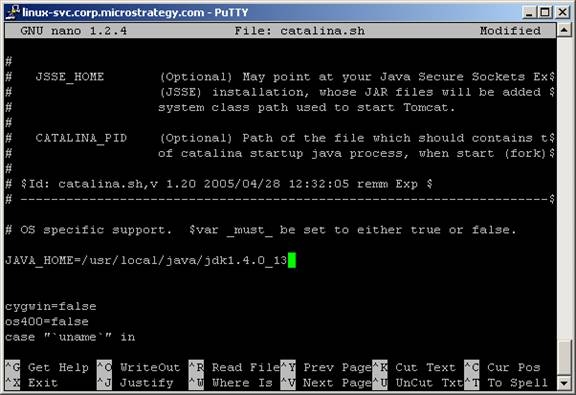
      • Unix: JAVA_HOME=/usr/local/java/jdk1.4.0_13
ka04W000000OdqXQAS_0EM4400000028lt.jpeg
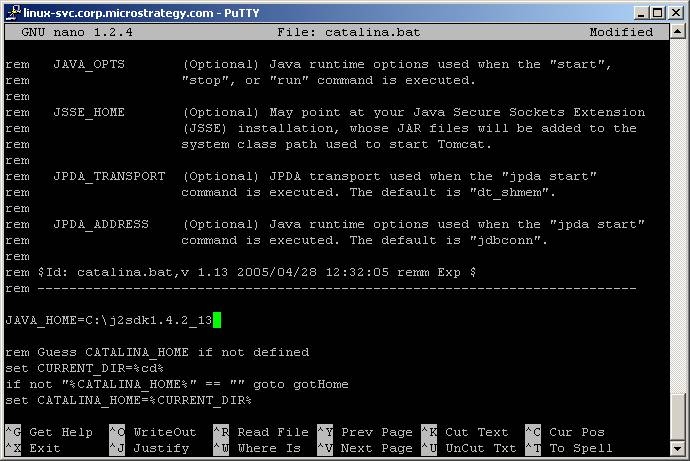
      • Windows: JAVA_HOME=C:\j2sdk1.4.2_14
ka04W000000OdqXQAS_0EM4400000028lr.jpeg
  • Save the changes.
  • Start Tomcat. When Tomcat starts it outputs the values of some variables including the JRE_HOME value. Check that the value of the JRE_HOME variable matches the path that was placed in the Catalina file.

Comment

0 comments

Details

Knowledge Article

Published:

June 15, 2017

Last Updated:

June 15, 2017