The default prompt answer can be found at the bottom of the value prompt if the prompt has a default answer in Strategy Web Universal 8.1.x:
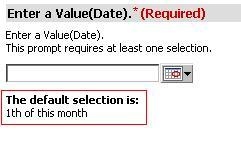
To modify this information on the prompt page, edit PromptObjectLayout.xml under \WEB-INF\xml\layouts. The following JSP tags render the default prompt answer:
<mstrlayout:if name="isAnswerComplex">
<mstrlayout:then>
<mstrlayout:render name="promptDefaultAnswer"/>
</mstrlayout:then>
</mstrlayout:if>
Removing this section of code will remove the default prompt answer information from any prompt object. Additionally, this code segment can be moved above the following code to display the default answer above where the user will input a prompt answer:
<mstrlayout:if name="areThereAvailableSelections">
<mstrlayout:then>
<mstrlayout:slot name="s1"/>
</mstrlayout:then>
...
Be sure to maintain best practices when customizing files so that customizations will not be lost during an upgrade. More information can be found in the Strategy Developer Library.
WARNING:
Customization Code Warning:
This customization is provided as a convenience to Strategy users and is only directly applicable to the version stated. While this code may apply to other releases directly, Strategy Technical Support makes no guarantees that the code provided will apply to any future or previous builds. In the event of a code change in future builds, Strategy may not be able to provide additional code on this matter even though this customization is provided at this time for this specific build.
