EducationSoftwareStrategy.com
StrategyCommunity

Knowledge Base

Product

Community

Knowledge Base

TopicsBrowse ArticlesDeveloper Zone

Product

Download SoftwareProduct DocumentationSecurity Hub

Education

Tutorial VideosSolution GalleryEducation courses

Community

GuidelinesGrandmastersEvents
x_social-icon_white.svglinkedin_social-icon_white.svg
Strategy logoCommunity

© Strategy Inc. All Rights Reserved.

LegalTerms of UsePrivacy Policy
  1. Home
  2. Topics

KB16188: How to create an email with the subject containing the subscription personalization in a Dynamic Subscription service in MicroStrategy Narrowcast Server


Community Admin

• Strategy


Article outline how to create an email with the subject containing the subscription personalization in a Dynamic Subscription service in MicroStrategy Narrowcast Server

SYMPTOM:
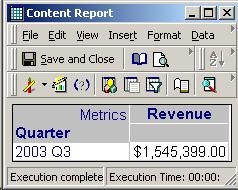
Placing the content information object of a report in the subject line yields all personalizations and not specified to the particular user selection in Strategy Narrowcast Server 
The underlying content delivered to the subscriber is as follows, where Quarter is the defining attribute for the personalization:
ka04W000000OeYbQAK_0EM440000002BUa.jpeg

 
ACTION:
In a dynamic subscription service, in order to get the personalization for each subscription in the subject line of the service, the following steps must be performed:
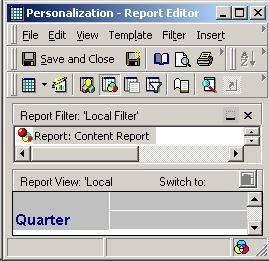
 

  • Within Strategy Developer (formerly Desktop), create a new report:
     
ka04W000000OeYbQAK_0EM440000002BUL.jpeg
    • In the grid of the report, place only the attribute that the personalization is regarding.
    • Add the report used in the content information object of the service as the filter for this new report, as shown below:
    • To hide the attribute name, change the Report Data Options display alias for the attribute.
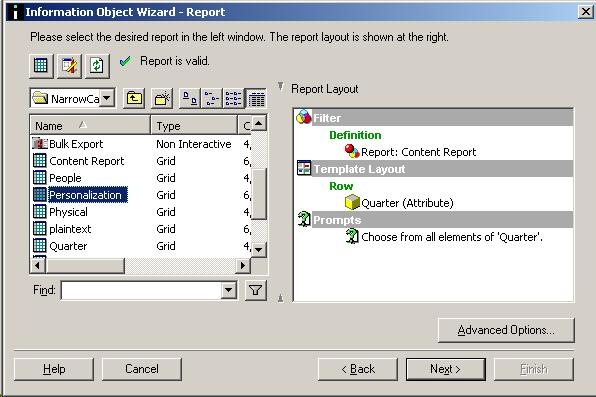
  • Within Strategy Narrowcast Server Administrator, follow the steps below:
     
ka04W000000OeYbQAK_0EM440000002BUJ.jpeg
    • Create a new content Information Object on the report created in step one, as shown below:
    • In the dynamic subscription service, navigate to the Message contents section.
    • Edit the subject line and add an existing information object, inserting this content information object.

Running the service will result in an email that has the subscriber's preference displayed in the subject line.


Comment

0 comments

Details

Knowledge Article

Published:

June 8, 2017

Last Updated:

June 8, 2017