EducationSoftwareStrategy.com
StrategyCommunity

Knowledge Base

Product

Community

Knowledge Base

TopicsBrowse ArticlesDeveloper Zone

Product

Download SoftwareProduct DocumentationSecurity Hub

Education

Tutorial VideosSolution GalleryEducation courses

Community

GuidelinesGrandmastersEvents
x_social-icon_white.svglinkedin_social-icon_white.svg
Strategy logoCommunity

© Strategy Inc. All Rights Reserved.

LegalTerms of UsePrivacy Policy
  1. Home
  2. Topics

KB16211: In MicroStrategy Enterprise Manager 9.x, data loading has failed with the error message 'Object variable or With block variable not set'


Community Admin

• Strategy


In MicroStrategy Enterprise Manager 9.x, data loading fails with the error message 'Object variable or With block variable not set'.

SYMPTOM:
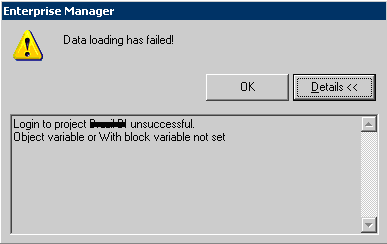
In Strategy Enterprise Manager 9.x, data loading fails with the following error message:
 

ka04W000000OeHlQAK_0EM440000002BUX.jpeg

 
Login to project unsuccessful.
Object variable or With block variable not set
 
CAUSE:
The project which the Strategy Enterprise Manager console is trying to reach cannot be found in Strategy Intelligence Server.
 
ACTION:
Run the following SQL:
 
SELECT * FROM EM_PROPS
 
The result should return a list of monitored projects with Project IDs. Users can check the problematic project (in the error message). It is possible that the project with the same project name is not loaded on Strategy Intelligence Server or the project does not have statistics logging enabled.
 
Make sure the target project is loaded on Strategy Intelligence Server and statistics are enabled.


Comment

0 comments

Details

Knowledge Article

Published:

June 12, 2017

Last Updated:

June 12, 2017