EducationSoftwareStrategy.com
StrategyCommunity

Knowledge Base

Product

Community

Knowledge Base

TopicsBrowse ArticlesDeveloper Zone

Product

Download SoftwareProduct DocumentationSecurity Hub

Education

Tutorial VideosSolution GalleryEducation courses

Community

GuidelinesGrandmastersEvents
x_social-icon_white.svglinkedin_social-icon_white.svg
Strategy logoCommunity

© Strategy Inc. All Rights Reserved.

LegalTerms of UsePrivacy Policy
  1. Home
  2. Topics

KB16221: How to find the context root of an application that has been deployed on IBM WebSphere Application Server 6.0


Community Admin

• Strategy


During the deployment process of an application (e.g. Strategy Web Universal 8.x), the administrator had to specify the context root of an application. If the administrator needs to see what the value of the context root was entered during the application deployment, then the following steps can be used to find the context root value:
 

  • Open the IBM WebSphere Administrator Console.
  • Navigate to Enterprise Applications.
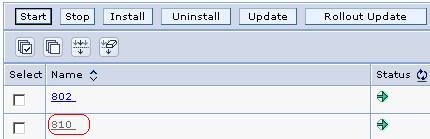
  • Click on the application for which to find the context root, as shown below:
ka04W000000OgegQAC_0EM4400000028mH.jpeg
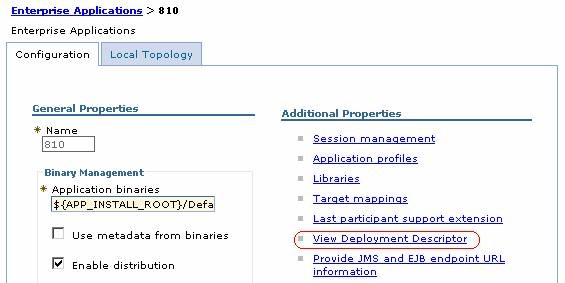
  • Click on View Deployment Descriptor, as shown below:
ka04W000000OgegQAC_0EM4400000028mF.jpeg
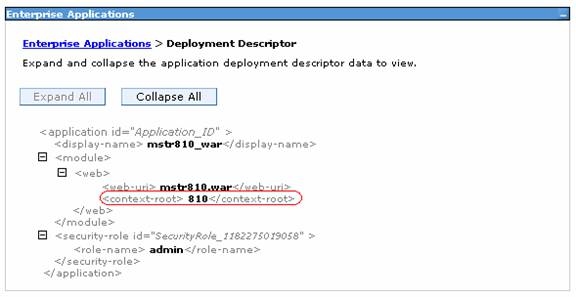
  • The value in bold of the context-root node is the context root value entered during the deployment of the application. The example below demonstrates that the value 810 is the context root of the application 810. Note: The application name is not always the same as the context root.
ka04W000000OgegQAC_0EM4400000028mG.jpeg

Comment

0 comments

Details

Knowledge Article

Published:

June 13, 2017

Last Updated:

June 13, 2017