EducationSoftwareStrategy.com
StrategyCommunity

Knowledge Base

Product

Community

Knowledge Base

TopicsBrowse ArticlesDeveloper Zone

Product

Download SoftwareProduct DocumentationSecurity Hub

Education

Tutorial VideosSolution GalleryEducation courses

Community

GuidelinesGrandmastersEvents
x_social-icon_white.svglinkedin_social-icon_white.svg
Strategy logoCommunity

© Strategy Inc. All Rights Reserved.

LegalTerms of UsePrivacy Policy
  1. Home
  2. Topics

KB16224: How to view filter details for a Freeform SQL report in MicroStrategy Developer 9.4.x-10.x


Stefan Zepeda

Salesforce Solutions Architect • Strategy


In a Freeform SQL report, there is no Report Filter window or filter object. However, there are two ways a user can view the filter details for a Freeform SQL report in MicroStrategy Developer 9.4.x-10.x

In a Freeform SQL report, there is no Report Filter window or filter object. However, there are two ways a user can view the filter details for a Freeform SQL report in Strategy Developer 9.4.x-10.x.
Option A :
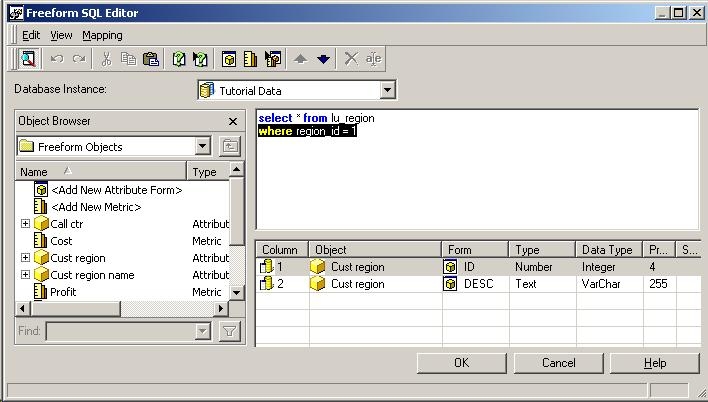
  • View design mode of the report.
  • Using the toolbar, select Data > Freeform SQL Definition.
  • The where clauses will be the filter information.
ka02R000000kX5LQAU_0EM440000002F10.jpeg

NOTE: This requires the user to have 'Define Freeform SQL Report' permissions which uses a Desktop Designer license.
 
Option B:
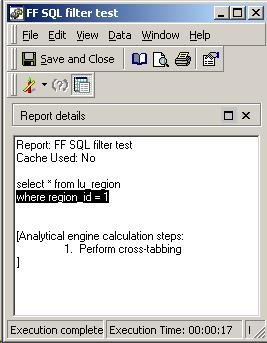
  • View the SQL View of the report.
  • The where clauses will be the filter information.
ka02R000000kX5LQAU_0EM440000002F17.jpeg

NOTE: This requires the user to have 'View SQL' permissions which uses a Desktop Analyst license.


Comment

0 comments

Details

Knowledge Article

Published:

April 10, 2017

Last Updated:

April 10, 2017