EducationSoftwareStrategy.com
StrategyCommunity

Knowledge Base

Product

Community

Knowledge Base

TopicsBrowse ArticlesDeveloper Zone

Product

Download SoftwareProduct DocumentationSecurity Hub

Education

Tutorial VideosSolution GalleryEducation courses

Community

GuidelinesGrandmastersEvents
x_social-icon_white.svglinkedin_social-icon_white.svg
Strategy logoCommunity

© Strategy Inc. All Rights Reserved.

LegalTerms of UsePrivacy Policy
  1. Home
  2. Topics

KB16233: How to use a custom expression to filter on previous months dynamically in MicroStrategy Developer 9.x and newer


Stefan Zepeda

Salesforce Solutions Architect • Strategy


This technical note describes how to use a custom expression to filter on previous months dynamically in MicroStrategy Developer 9.x and newer

Users may need to filter the data to the previous months dynamically based on the current month similar to dynamic date filtering.
To create a filter that qualifies dynamically on months prior to the current month, users need to create a custom expression in an advanced qualification through Strategy Developer
 
The following example is created with Strategy Tutorial project:
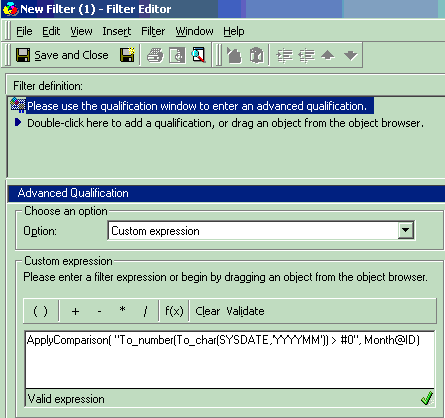
  • Create a new filter in Strategy Developer
  • Choose the 'Add an advanced qualification' option and click on the 'OK' button.
  • By default, 'Custom Expression' is the option selected for a new Advanced Qualification.
  • Enter the following expression: ApplyComparison("{Current Month function} > #0", Month@ID )
ka02R000000kXXpQAM_0EM440000002F6Q.gif
  •  
    ApplyComparison( "To_number(To_char(SYSDATE,'YYYYMM')) > #0", Month@ID)
  • {Current Month} is the warehouse database vendor specific syntax to determine the current month in the appropriate format. The illustration above uses Oracle syntax.
     
  • Validate the expression by clicking on 'Validate'
  • Click the 'OK' button to complete the qualification.
  • Click the 'Save and Close' button in the Filter Editor toolbar.

Comment

0 comments

Details

Knowledge Article

Published:

June 14, 2017

Last Updated:

June 14, 2017