This steps below describe method to create a value prompt for each row of a report that has n rows and these rows correspond to elements in the Top n Rank of a metric in Strategy Developer
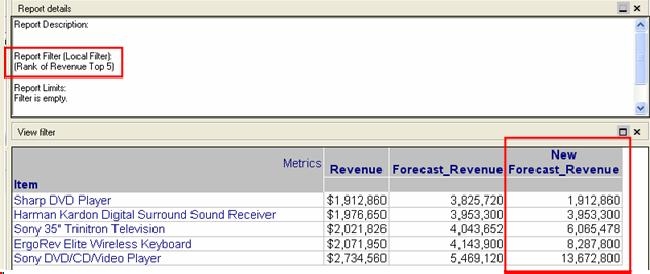
Consider a report that has Item attribute, Revenue metric and Forecast Revenue metric. The report filter is defined as Rank of Revenue Top 5. To calculate the Forecast Revenue, a value prompt is created and is included in the definition of the Forecast Revenue metric.
The Forecast Revenue metric is defined as Revenue * ?. When the report with the Forecast Revenue metric is executed, the value prompt is only answered once and the same value is applied to all the rows on the report. However, if the requirement is to have different prompt values for each row, it is not possible to do that with any out-of the-box functionality provided by Strategy.
WORKAROUND:
The workaround explained here only works for reports that have filtering criteria based on Rank of a metric. The definition of the Forecast Revenue metric is modified to the following:
CaseV(Rank(Revenue), 1.0, (Revenue * ?), 2.0, (Revenue * ?), 3.0, (Revenue * ?), 4.0, (Revenue * ?), 5.0, (Revenue * ?))
For the above metric, five different value prompts have to be created and each prompt has to be associated with each row of the report. Using this definition for the Forecast Revenue, the user is prompted five times and a different value can be given for each row in that report.
The executed report with Forecast Revenue (Value prompt answered as 2) and New Forecast Revenue (with Value Prompt 1 to Value Prompt 5 answered as 1, 2, 3, 4 and 5 respectively) is shown below.