EducationSoftwareStrategy.com
StrategyCommunity

Knowledge Base

Product

Community

Knowledge Base

TopicsBrowse ArticlesDeveloper Zone

Product

Download SoftwareProduct DocumentationSecurity Hub

Education

Tutorial VideosSolution GalleryEducation courses

Community

GuidelinesGrandmastersEvents
x_social-icon_white.svglinkedin_social-icon_white.svg
Strategy logoCommunity

© Strategy Inc. All Rights Reserved.

LegalTerms of UsePrivacy Policy
  1. Home
  2. Topics

KB16276: How to enable the New Grid dialog box in MicroStrategy Developer 9.x


Stefan Zepeda

Salesforce Solutions Architect • Strategy


How to enable the New Grid dialog box in MicroStrategy Developer 9.x

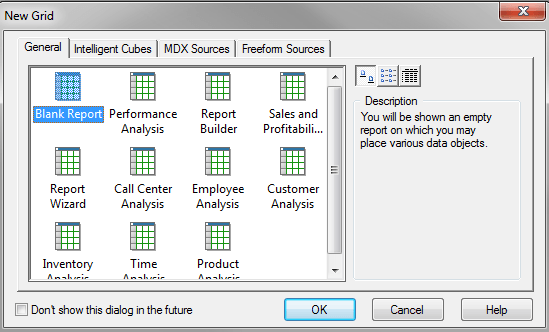
By default in Strategy Developer 9.x, when creating a new grid, the New Grid dialog box appears with a selection of grid templates, as shown below:
 

ka02R000000kcbpQAA_0EM440000002FE0.png

 
The window will not appear when creating a new report if the checkbox to not show the dialog box in the future is checked.
 
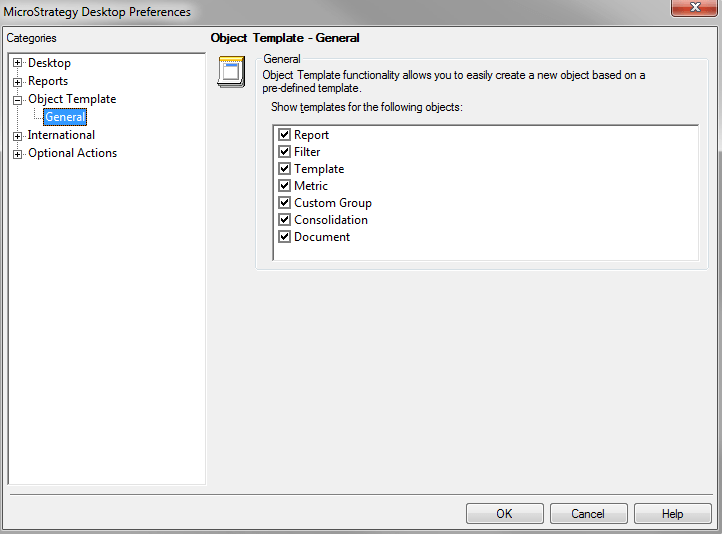
To enable the New Grid dialog box again, go to the Developer Preferences General tab and check the report box in the Object Template section, as shown below:
 

ka02R000000kcbpQAA_0EM440000002FDz.png


Comment

0 comments

Details

Knowledge Article

Published:

April 11, 2017

Last Updated:

April 11, 2017