SYMPTOM:
A user attempts to run a report through Strategy Reporter (formerly Desktop) with Strategy Intelligence Server Universal and the following error occurs:
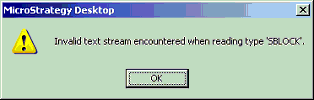
Invalid text stream encountered when reading type 'SBLOCK'
This is a generic error against the metadata. In this case, the metadata resides on Sybase Adaptive Server 12.5.x or 15.0.x. The issue has been seen for the following codepages used on the Sybase Adaptive Server database:
CAUSE:
The issue occurs because the IANAAppCodePage value is not appropriately set in the Strategy ODBC Driver for Sybase ASE Wire Protocol for the database codepage used on Sybase. The IANAAppCodePage value is used by the Strategy ODBC Administrator (essentially the DataDirect ODBC Driver Manager on Unix) to perform any transliteration necessary for International characters.
The value of IANAAppCodePage is set in the odbc.ini file. Refer to the following Strategy Knowledge Base technical note for details regarding this setting:
KB10136 (KB5300-752-0498) - How to configure ODBC Data Source Names for international environments in Strategy Intelligence Server Universal
ACTION:
Set the IANAAppCodePage value to appropriately match the codepage of the Sybase database. For the two codepages mentioned above, the appropriate values should be as follows:
By default, the IANAAppCodePage value is set to 106 when a DSN is created - 106 is the value for UTF-8. This may be changed to 111 (for ISO15) by following the steps below:
Follow the same steps for CP850 codepage except for changing the value to 2009.
Third Party Software Installation:
WARNING:
The third-party product(s) discussed in this technical note is manufactured by vendors independent of Strategy. Strategy makes no warranty, express, implied or otherwise, regarding this product, including its performance or reliability.
