In Strategy Web 9.x and 10.x, the user can find the 'Maximum number of cells to export to plain text' and 'Maximum number of cells to export to HTML and Excel with formatting' export preferences at the 'Project Defaults' level when logging in as a user with administrative privileges, as shown below:

These values should be set to allow for the product of the number of rows x number of columns that the administrator will allow users to export. These cells correspond to the metric values that exist at the intersection of attribute elements (rows) and each metric on a report (columns).
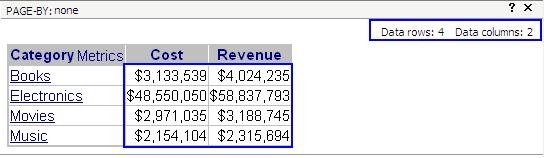
In the report shown below, there are four rows and two columns. Therefore, the number of cells within the following report is 4 x 2 = 8 cells. This value is the value that is taken into account by the 'Maximum number of cells to export to plain text' and 'Maximum number of cells to export to HTML and Excel with formatting' Export preferences.
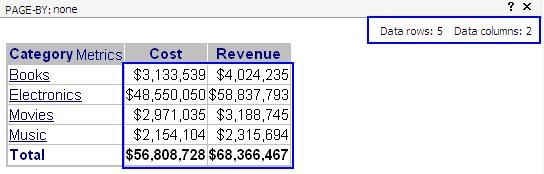
These preferences also take into account if any subtotal is displayed on the report, and henceforth, such subtotal values will count as cells too. By adding the 'Total' subtotal to the previously stated report will lead to the report cell count to be equal to ten cells (5 rows x 2 columns). Two more units are added in the count that correspond to the 'Total' subtotal values, as shown below:
NOTE: In the event that the report contains only attributes, then the number of cells will still be equal to the number of rows x columns generated by the attributes, however the column display at the top right corner of the report only considers metrics as columns, so this will display zero.
NOTE: In Strategy Web 9.x, if this value (number of cells in the report) exceeds the value set at the 'Project Defaults' preference level, then the interface will not allow the user to export the result set, graying out the export button, preventing the export:

NOTE: If a report is using the 'Page-by' functionality, then this preference applies to the current page-by of the report and is applied separately to each page-by being displayed. If one page exceeds the value set at the 'Project Defaults' preference level, then the interface will not allow for this page to be exported, but if the user changes the page and the cell count is within the limit of the value set at the 'Project Defaults' preference level, then the interface will allow the user to export the page.
