EducationSoftwareStrategy.com
StrategyCommunity

Knowledge Base

Product

Community

Knowledge Base

TopicsBrowse ArticlesDeveloper Zone

Product

Download SoftwareProduct DocumentationSecurity Hub

Education

Tutorial VideosSolution GalleryEducation courses

Community

GuidelinesGrandmastersEvents
x_social-icon_white.svglinkedin_social-icon_white.svg
Strategy logoCommunity

© Strategy Inc. All Rights Reserved.

LegalTerms of UsePrivacy Policy
  1. Home
  2. Topics

KB16383: What do the ‘Total number of rows’ and ‘Total number of columns’ values correspond to in the ‘Show Advanced Details’ section of the ‘Report Details’ of a report in MicroStrategy Web?


Community Admin

• Strategy


This article explains the meaning of ‘Total number of rows’ and ‘Total number of columns’ in the ‘Show Advanced Details’ section of the ‘Report Details’ of a report in MicroStrategy Web

There are the options ‘Total number of rows’ and ‘Total number of columns’ in the ‘Show Advanced Details’ section of the ‘Report Details’ of a report in Strategy Web.
 
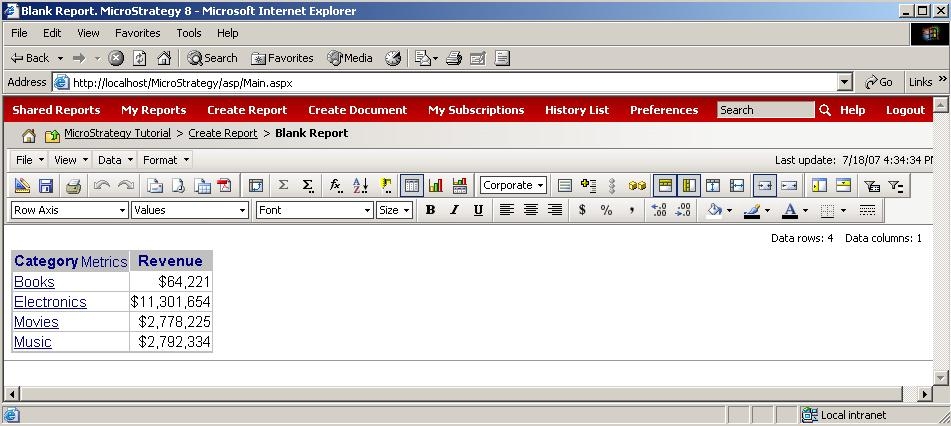
The user can create a simple report with one attribute (e.g. the 'Category' attribute) and two metrics (e.g. the 'Revenue' metric), as shown below:
ka04W000000OdQMQA0_0EM4400000028lJ.jpeg

 
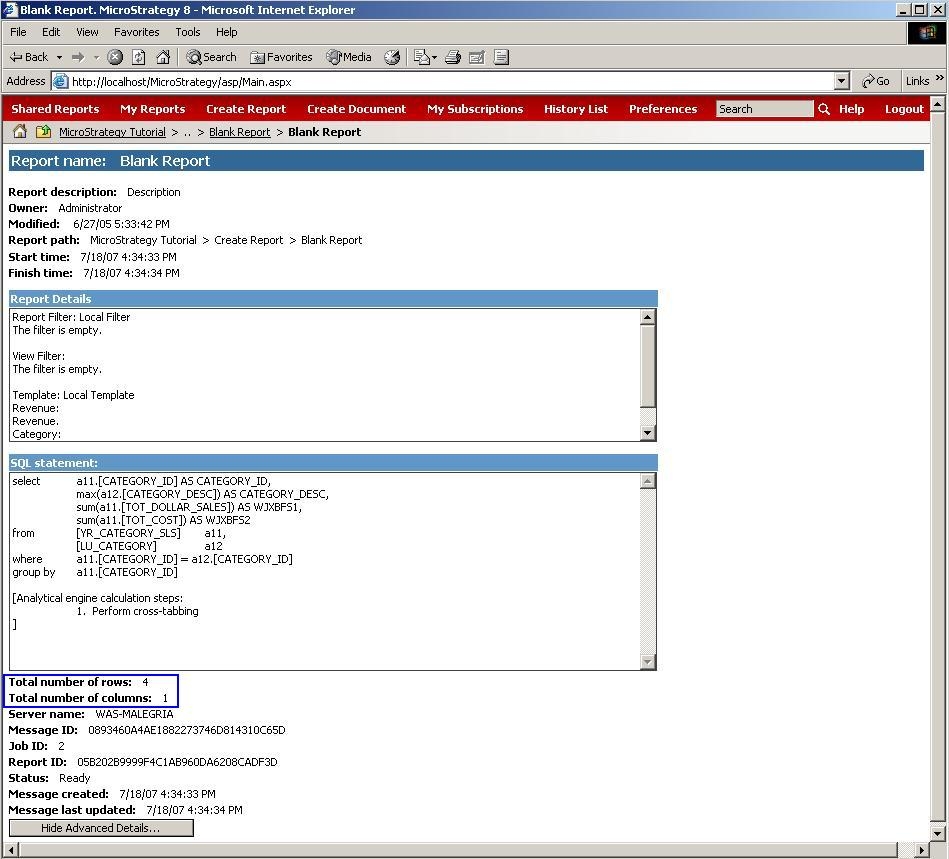
In Strategy Web, the user can find the 'Total number of rows' and 'Total number of columns' in the 'Show Advanced Details' section of the 'Report Details' for this report, as shown below:
ka04W000000OdQMQA0_0EM4400000028lD.jpeg

 
The 'Total number of rows' also takes into account if any subtotal is displayed on the report.
 
NOTE: If a report is using the 'Page-by' functionality, then these totals apply to the current page-by of the report and are applied separately to each page-by being displayed.


Comment

0 comments

Details

Knowledge Article

Published:

June 22, 2017

Last Updated:

June 22, 2017