SYMPTOM
An OLAP cube is imported into Strategy from Hyperion Essbase containing a ragged or unbalanced hierarchy. Attribute elements for the imported hierarchy appear in levels that do not match the arrangement of the hierarchy members as defined in Hyperion Essbase.
For example, this Essbase sample cube's Product hierarchy is unbalanced, as shown below:
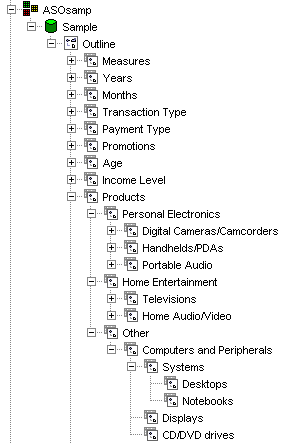
This hierarchy has a total of five levels, with the longest path being Product > Other > Computers and Peripherals > Systems > Desktops (or Notebooks). Not all of the branches in the tree extend all the way down to the fifth level, making it an unbalanced hierarchy.
Note: Not all of the branches are fully expanded in this illustration.
When browsing the hierarchy in the Strategy Data Explorer, the results are not consistent with the Essbase display.
First, browsing from the top of the hierarchy, the 'Personal Electronics' and 'Home Entertainment' branches are not available. In fact, the only branch that appears is the one that goes all the way down to the fifth level, as shown below:
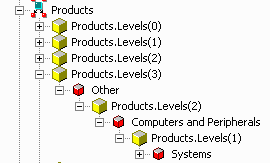
Note: In Essbase, the higher-numbered levels represent the top of the hierarchy. This is the reverse of most OLAP Cube providers, which label the top of the hierarchy with level 0 and child levels with successively increasing numbers.
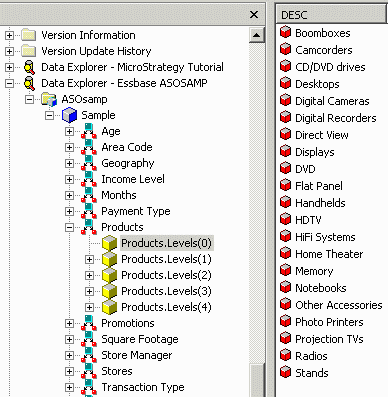
Second, level 0 might be expected to include only Desktops and Notebooks, but in fact, level 0 presents all leaf nodes in the tree (that is, all elements that have no descendents), as shown below:
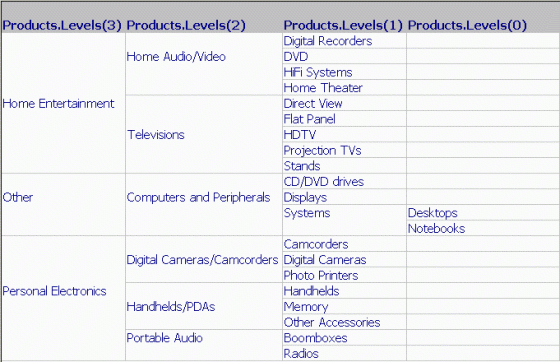
Report results are also affected. Placing level 0-3 on a report (level 4 contains only the single element 'Products') produces the following result. Note that 'Personal Electronics' and 'Home Entertainment' are siblings of 'Other' in the Essbase outline, but the report places them in the next lower level, with an empty parent. Also, where the Essbase tree is weighted toward the top, the display in Strategy pushes attribute elements toward lower levels, as shown below:
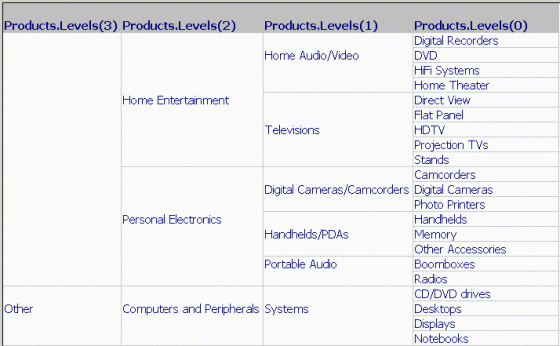
As a result, it is harder for users to infer the expected data relationships as defined in Essbase, and harder to navigate the hierarchy in prompts.
CAUSE
To understand why this issue occurs, it is important to understand how Essbase assigns hierarchy members to levels, and how this differs from the tree display in Essbase Deployment Services.
In Essbase, the level number of a given number is determined from that member's position relative to the bottom of the tree. More precisely, it is the number of generations of children that the given member has. If a member, for example, 'Notebooks' in the sample hierarchy, has no children, it is placed into level 0. 'Home Entertainment,' on the other hand, has children ('Home Audio/Video,' 'Televisions') and grandchildren ('Digital Recorders' and so on), so it goes into level 2.
This manner of assignment behaves as expected when a hierarchy is balanced -- that is, when every branch of the tree has exactly the same number of levels. In the sample Products hierarchy, most branches have three levels below the root Products node, for instance, Home Entertainment > Home Audio/Video > Digital Recorders. Two of the branches go one level further:
By Essbase's methodology, 'Desktops' and 'Digital Recorders' are both level 0, because neither member has any children. The problem is that these two members are not the same distance from the top of the hierarchy, and users will generally be more familiar with the top-down tree structure.
This accounts for all of the unexpected behavior in Strategy:
Essbase handles this by using a special property of hierarchy members called 'generation number.' Where level numbers are assigned from the bottom of the hierarchy, generation numbers are assigned from the top.
ACTION
For reports using ragged or unbalanced hierarchies in Essbase to display correctly in Strategy, the VLDB property 'MDX Add Generation Property' may be enabled, as shown below:
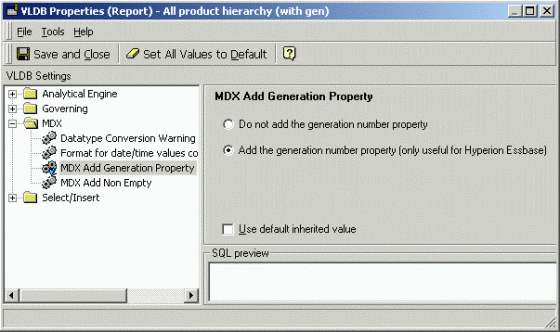
When the option 'Add the generation number property' is selected, Strategy will use the generation number to display the attribute elements in the expected columns. If this property is enabled in the above report definition, the results are changed as follows. Note that all three of the immediate descendents of the Products root node now display in the same level (level 3).
For the generation number to function correctly, the report template must include all the hierarchy level attributes for which results will be returned in the dataset. If this is not the case, the report may fail with an error, described in the following Strategy Knowledge Base technical note:
KB16412 (KB5200-802-2357): 'Unexpected level found in result set' error occurs when running a report against Hyperion Essbase in Strategy 8.0.2 and newer
In current Strategy versions, the generation number property does not apply to hierarchy or element browsing. This is logged for review by Engineering. Contact Strategy Technical Support for an update on the status of this issue.
KB16411
