SYMPTOM:
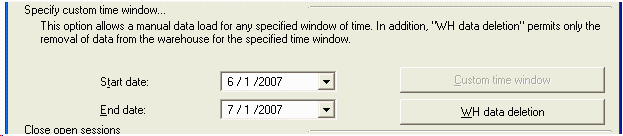
Users notice that the 'Custom time window' data load option is grayed out or disabled when trying to perform a custom data load in the Strategy Enterprise Manager 9.x console, as shown below:
CAUSE:
This issue occurs because there exists more than one incomplete data load (failed migration) detected by the Strategy Enterprise Manager 9.x console. This can be verified by performing the following query against the Strategy Enterprise Manager 9.x warehouse database:
Select * from EM_IS_LAST_UPDATE WHERE IS_STATUS = 0
If the SQL returns more than one row, then this is the cause. A row that contains a value with IS_STATUS = 0 signifies that there was an incomplete migration for a particular date. Only one row should ever be returned when running this SQL pass. Having more than one row returned will cause this issue.
For more information, refer to the following Strategy Knowledge Base technical note:
KB8192: 'More than one failed migration windows were found. This process cannot continue' error message appears when performing a dataload in Strategy Enterprise Manager.
ACTION:
Users can manually update the IS_STATUS column of the EM_IS_LAST_UPDATE table wherever they see zeroes except the very first row that reads:

Once the EM_IS_LAST_UPDATE table is updated, the users should run a Custom Time Window Load under the Data Load Options in the Strategy Enterprise Manager 9.x console, which encompasses the time period for which they have not been able to do the data load or have been missing data.
NOTE: If the users just update the EM_IS_LAST_UPDATE table without a Custom Time Window Load to follow, they can experience loss of data for the time period that begins with the timestamp in the IS_WIN_END column of the first updated IS_STATUS row of zero ending with the last such updated row.
