EducationSoftwareStrategy.com
StrategyCommunity

Knowledge Base

Product

Community

Knowledge Base

TopicsBrowse ArticlesDeveloper Zone

Product

Download SoftwareProduct DocumentationSecurity Hub

Education

Tutorial VideosSolution GalleryEducation courses

Community

GuidelinesGrandmastersEvents
x_social-icon_white.svglinkedin_social-icon_white.svg
Strategy logoCommunity

© Strategy Inc. All Rights Reserved.

LegalTerms of UsePrivacy Policy
  1. Home
  2. Topics

KB16426: Object browsing query flow in 2-tier mode in MicroStrategy Developer 9.x and 10.x


Stefan Zepeda

Salesforce Solutions Architect • Strategy


Object browsing query flow in 2-tier mode in MicroStrategy Developer 9.x and 10.x

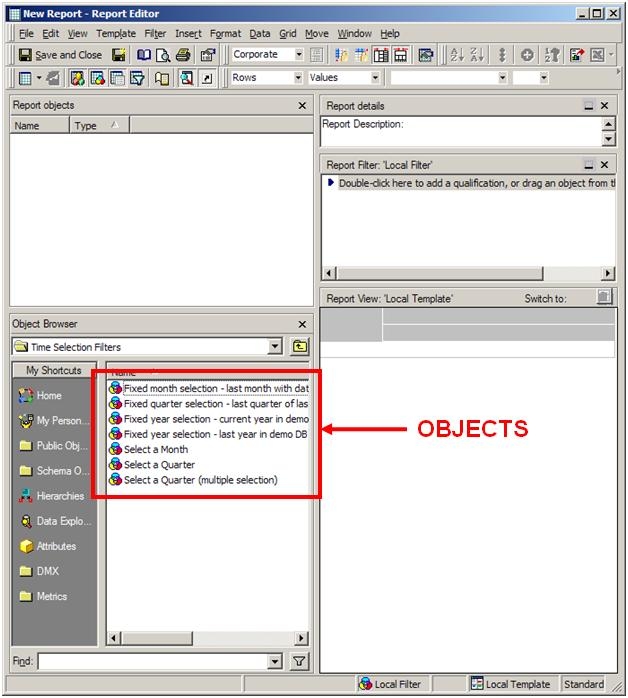
This technical note explains the query flow that occurs when users make object requests (i.e. browses for objects) in a 2-tier mode in Strategy Developer 9.x and 10.x. For example, when creating a report, a user may need to retrieve a specific filter in order to apply it. This action initiates an object-browsing query, as shown below:
 

ka02R000000kbt1QAA_0EM440000002FCM.jpeg

 
NOTE: If selecting a specific filter, the list that appears in the Report Editor displays all the available filters. If selecting a different kind of object, such as a metric or attribute, the list that appears in the Filter Editor displays all the available metrics or available attributes for the creation of the report template.
 
Query Flow
The diagram below explains the query flow that occurs in Strategy Developer 9.x and 10.x in 2-tier mode.
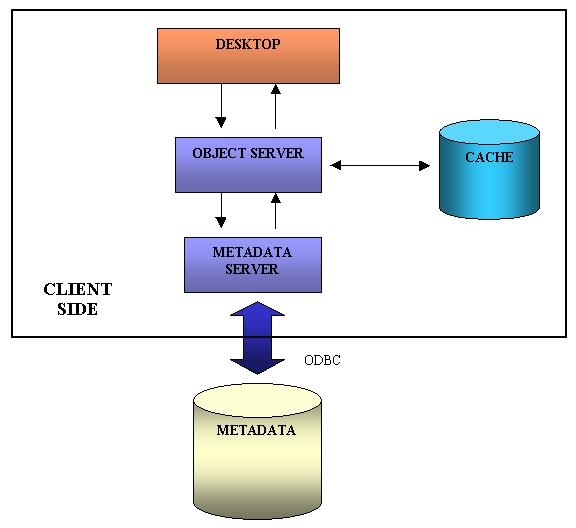
 

  • The Object Server handles all requests for objects from the client. The Object Server must access the Metadata Server to query the metadata.
  • Instantiated (previously requested) objects are cached on the client side in the Object Server. If an object that has already been instantiated is requested, it will be returned directly from the cache in the Object Server without invoking the Metadata Server or querying the metadata.
ka02R000000kbt1QAA_0EM440000002FCW.jpeg


Comment

0 comments

Details

Knowledge Article

Published:

June 6, 2017

Last Updated:

June 6, 2017