SYMPTOM:
The statistics can be purged for a specified date range from Project Configuration > Statistics > Purge in Strategy Desktop 9.x. When users attempt to purge statistics, they find that the data in the statistics tables is not purged correctly for the dates specified.
The following error message is recorded in the DSSErrors log when the diagnostic key 'Error' under Database Classes is enabled and the statistics repository resides on an Oracle database:
Call SQLExecDirect got SQL_ERROR
ORA-01013: user requested cancel of current operations
Note: This error message is associated with a DELETE FROM statement on a statistics table.
CAUSE:
By default, there is a ten second timeout on the SQL statements involving the purging of statistics data. If the delete operation against a particular statistics table cannot be performed within ten seconds, a SQLCancel is issued by Statistics Manager. Hence, the statistics data is not purged and the above error message is received.
ACTION:
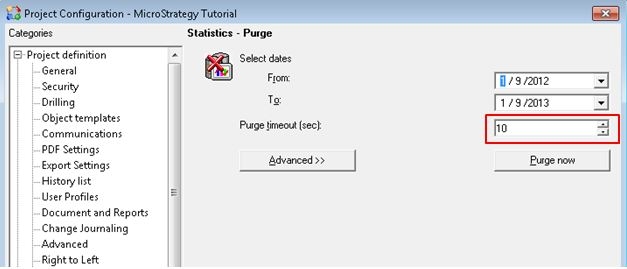
Depending on what level the user wants to purge statistics, they can increase the Purge Timeout setting to resolve the above error. The default value for this setting is 10 seconds. To purge statistics for a particular project, Purge Timeout setting can be found under Project Configuration > Statistics >, Purge as shown below:
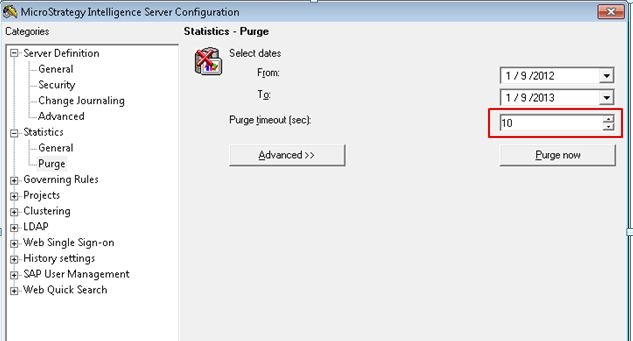
To purge statistics data for all projects logging statistics simultaneously from a particular server machine, Purge Timeout setting can be found in the Database Purge section under Strategy Intelligence Server Configuration > Server Definition > Statistics > Purge, as shown below:
For additional information on the above setting, refer to the following Strategy Knowledge Base technical notes:
