Introduction
Report and element requests are submitted from Strategy Intelligence Server 9.x to the data warehouse through a database connection thread. Results of these requests are also returned to Strategy Intelligence Server 9.x through the database connection thread.
If a system has hundreds of concurrent users submitting requests, it is important to find the number of threads that strikes a good balance between quickly serving each user request while not overloading the system. This number falls in the range depicted as the optimal use of resources, as shown in the figure below:

Once the number of threads is calculated, priorities can be set to control how many threads are dedicated to serving jobs meeting certain criteria.
Monitoring Database Connection Threads
To monitor whether the number of database connection threads is effective in a particular system, Database Connection Monitor can be used. It enables users to view:
Setting the number of database connection threads
To set the number of database connection threads allowed at one time in Strategy Intelligence Server 9.x, follow the steps below:
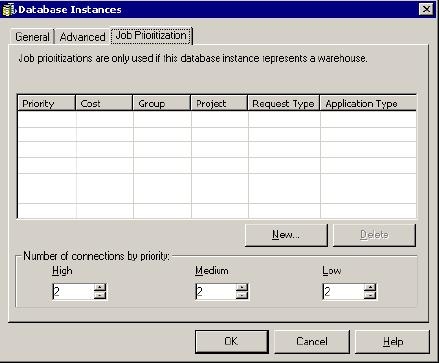
These settings apply to all projects that use the selected database instance. The default values for the High, Medium, and Low priorities are set to 2 each, as seen below. If no prioritization is set, only two Low connections will be used. All reports have a default of Low prioritization. Therefore, even though it is not required to set Medium and High connections, there should be at least one low connection, because Low priority is the default job priority.
For additional details on setting job prioritization and connection management, refer to the following Strategy Knowledge Base technical notes:
