EducationSoftwareStrategy.com
StrategyCommunity

Knowledge Base

Product

Community

Knowledge Base

TopicsBrowse ArticlesDeveloper Zone

Product

Download SoftwareProduct DocumentationSecurity Hub

Education

Tutorial VideosSolution GalleryEducation courses

Community

GuidelinesGrandmastersEvents
x_social-icon_white.svglinkedin_social-icon_white.svg
Strategy logoCommunity

© Strategy Inc. All Rights Reserved.

LegalTerms of UsePrivacy Policy
  1. Home
  2. Topics

KB16489: When using Teradata as a Metadata, the project duplication log contains errors 'The string contains an untranslatable character' with MicroStrategy Developer


Stefan Zepeda

Salesforce Solutions Architect • Strategy


When using Teradata as a Metadata, errors can be seen during the process of duplicating a project into the Teradata Metadata. The full error text is ' The string contains an untranslatable character'.

SYMPTOM:
When using Teradata as a Metadata, errors can be seen during the process of duplicating a project into the Teradata Metadata. The full error text is ' The string contains an untranslatable character'.
 
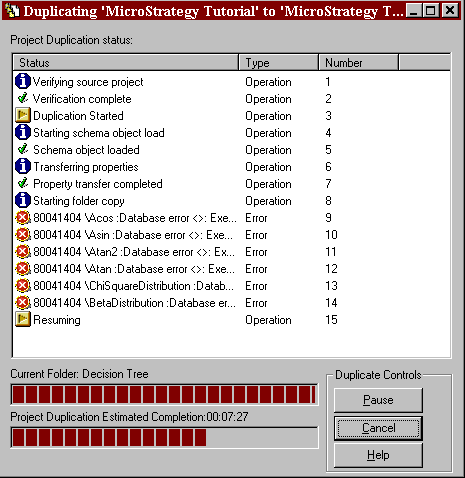
This occurs for six of the objects representing mathematical functions. Those functions are:
Acos
Asin
Atan
Atan2
ChiSquareDistribution
BetaDistribution
 
The on-screen process dialogue for the duplication process will show an error as follows:
ka02R000000kWVeQAM_0EM440000002SWm.gif

 
The errors are not fatal and the project will continue to duplicate, but the six functions in question will not be present in the duplicated project.
 
The following error is seen in Duplicate.log:


Database error <>: Execute Query failed. Error type: Odbc error. Odbc operation attempted: SQLExecDirect. The string contains an untranslatable character.
 
 
CAUSE:
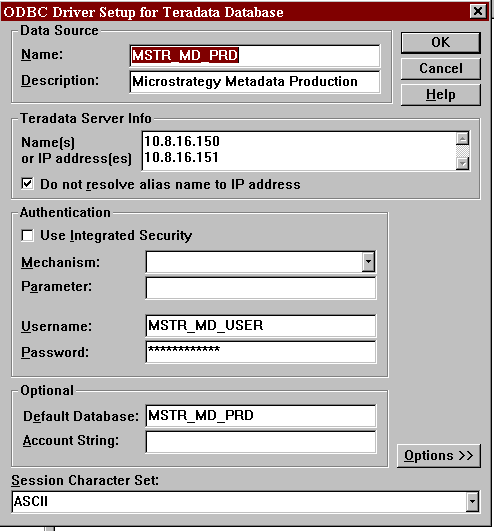
The Teradata ODBC connection to the Metadata is set up to use ASCII encoding, rather than UTF-8 encoding. The latter is more flexible and is a requirement to handle some of the characters encoded in the Metadata.
 
This is a setting set at the DSN Level, within the ODBC Administrator. This setting defaults to 'ASCII'.
 
ACTION:

  • Change the encoding in the DSN from 'ASCII' to 'UTF-8'. This setting is at the bottom of the dialogue box for the Teradata ODBC DSN configuration.
ka02R000000kWVeQAM_0EM440000002SWp.gif
  • Change this setting from ASCII (as shown) to UTF-8.
  • It is now necessary to re-start the Strategy Intelligence Server service. This is because the setting in the DSN only takes effect when a connection is initially made. In order to disconnect and reconnect the ODBC connection, the server service must be restarted.

Comment

0 comments

Details

Knowledge Article

Published:

July 6, 2017

Last Updated:

July 6, 2017