EducationSoftwareStrategy.com
StrategyCommunity

Knowledge Base

Product

Community

Knowledge Base

TopicsBrowse ArticlesDeveloper Zone

Product

Download SoftwareProduct DocumentationSecurity Hub

Education

Tutorial VideosSolution GalleryEducation courses

Community

GuidelinesGrandmastersEvents
x_social-icon_white.svglinkedin_social-icon_white.svg
Strategy logoCommunity

© Strategy Inc. All Rights Reserved.

LegalTerms of UsePrivacy Policy
  1. Home
  2. Topics

KB16494: 'XMLA Exception: SAX Parser Fatal Error' message appears when attempting to access XMLA data sources in MicroStrategy


Community Admin

• Strategy


This article describes an error that can occur with XMLA MDX data sources

SYMPTOM
 
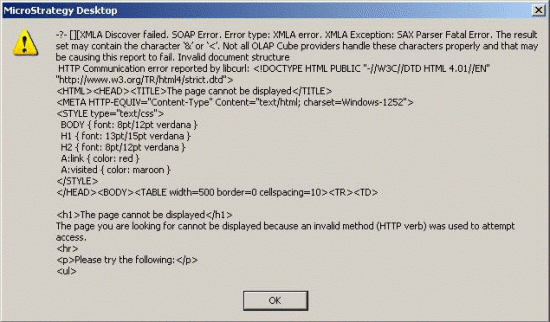
After preparing an XMLA database instance for connection to Microsoft analysis services or Hyperion Essbase, a user attempts to connect to the OLAP cube catalog to import cubes. An error similar to the following is received:
 

ka04W000000OfF8QAK_0EM440000002FBx.gif

 
XMLA Discover failed. SOAP Error. Error type: XMLA error. XMLA exception: SAX parser fatal error. The result set may contain the character '&' or '<'. Not all OLAP cube providers handle these characters properly and that may be causing this report to fail. Invalid document structure
This type of error may also occur when browsing attribute elements or running reports.
 
CAUSE
 
When using XMLA data sources, results are sent to the Strategy Intelligence Server in a well-formed XML document. Strategy parses the document using the SAX XML parser and converts the XML nodes into the data structures required for further Strategy Intelligence Server processing.
 
If XML parsing fails for any reason, this error is the result. Although the error suggests that special characters such as '&' or '<' could be the cause, XML parsing can fail for any number of reasons that may be entirely unrelated to the presence of special characters in the results.
 
Some possible causes of this error are:
 

  • Connecting to an incorrectly configured XMLA provider. The provider may send error text in place of a proper XML string.
  • Connecting to a web server that is not hosting an XMLA provider. As in the above illustration, a 'page cannot be displayed' or other 404 error page may be returned, which obviously will not consist of valid XML.
  • Attempting to retrieve a long XML result that is truncated in transit. If the XML result is not properly terminated, parsing will fail.
  • Networking errors (failure to resolve the host, Web application server down, etc.)

In theory, special character issues should be exceptionally rare because it is the XMLA provider's responsibility to escape special characters properly. If a data element such as 'Gifts & Toys' is not correctly encoded as 'Gifts & Toys,' then the XMLA provider has rendered a result that does not conform to XML specifications, in which case the incorrect behavior is in the XMLA provider, not in Strategy.
 
The 'special character' verbiage in this error message is, in reality, generic error text that should not be taken as an accurate diagnosis of the problem.
 
ACTION
 
Additional troubleshooting must be performed to determine the true cause of the invalid XML. Steps may include:
 

  • Examining the actual result sent from the Web application server. In the above case, the fact that a 'page cannot be displayed' HTML document is returned would indicate that the URL for the XMLA provider specified in the database connection object in Strategy is incorrect.
    tcpTrace can be useful in this context, per the following Strategy Knowledge Base article.
     
  • KB15796 - How to use SOAP tracing to troubleshoot connectivity issues with XMLA data sources in Strategy
     
  • Use of the Strategy XMLATest tool to verify basic connectivity to the XMLA provider, as outlined in the following Strategy Knowledge Base article:
     
  • KB14715 - Feature in Strategy: XMLA Connectivity Test Tool
     
  • Use of the Microsoft Sample XMLA application to verify correct connection and query behavior, as outlined in the following Strategy Knowledge Base article:
     
  • KB15897 - How to use the Microsoft Sample XMLA application to test connectivity and query behavior against XMLA data sources
     

In most cases, this error is found to be the result of a configuration problem.


Comment

0 comments

Details

Knowledge Article

Published:

May 5, 2017

Last Updated:

May 5, 2017