Report designers may wish to create a report against an MDX cube data source, such as SAP BW, Microsoft Analysis Services or Hyperion Essbase, which shows the user results for the previous x units of time, for instance, the last 12 weeks, six months, and so on. In Strategy relational OLAP (ROLAP) reports, this would be done using dynamic date filters. Dynamic date qualifications are not supported against MDX cube data sources, but the same results can be achieved by using custom MDX expressions.
For details on creating custom MDX metrics in Strategy, consult the following Strategy Knowledge Base article:
KB16057: How to create customized metric expressions for MDX Cube data sources in Strategy Engine
In MDX, the LastPeriods() function returns a set of hierarchy members (which correspond to attribute elements in Strategy) that exist in a row ending with a given element. For example, in a Microsoft Analysis Services cube with month-level data, the following MDX expression using LastPeriods() returns exactly six rows of data, corresponding to the six months ending with December 2002. The first argument to LastPeriods is the number of elements desired; the second is the ID of the member (attribute element) that should end the set.
select
{ [Measures].[Amount] } on columns,
{ LastPeriods(6, [Date].[Calendar].[Month].&[2002]&[12]) } on rows
from [Finance]
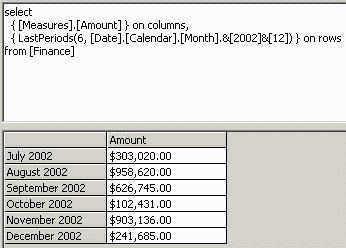
In Strategy, custom MDX expressions may be used only in metrics ("member expressions" in MDX). The above usage of LastPeriods() is a set expression that is used in one of the SELECT axes, which cannot be used exactly as is in Strategy.
A member expression can filter its result set, however. The method to use depends on whether the filtering attribute is used or not used on the template.
Filtering attribute on template
As in the following Strategy Knowledge Base article, if a filtering attribute is used on the template, the custom metric expression must check the dimension's current member against the condition. If the condition is met, the correct value should be passed through; otherwise it should be suppressed with NULL.
KB16100: How to write a custom metric formula in MDX to filter on an attribute in Strategy Engine
For this type of rolling analysis, it would be more typical to have the filtering attribute on the template so that each of the elements could be seen.
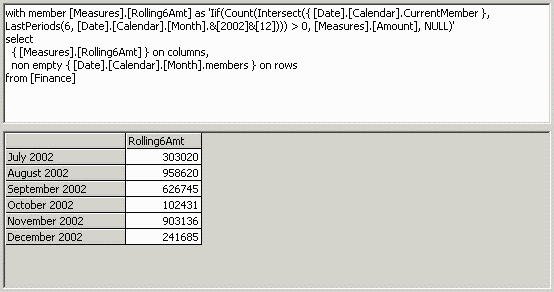
Instead of comparing against a fixed or prompted value, this metric formula should check that the current member belongs to the set returned by LastPeriods(). The proper way to do this is to intersect the current member with the set, and see if the intersection is empty or not.
The following syntax accomplishes this:
Iif(Count(Intersect({ [dimension].[hierarchy].CurrentMember }, LastPeriods(number_of_elements, member_expression))) > 0, metric_id, NULL)
For instance in the above cube, the following formula would be used:
Iif(Count(Intersect({ [Date].[Calendar].CurrentMember }, LastPeriods(6, [Date].[Calendar].[Month].&[2002]&[12]))) > 0, [Measures].[Amount], NULL)
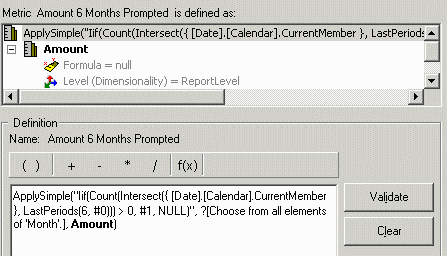
It is possible to prompt the user for the concluding element by using ApplySimple:
Alternately, if the report should always end with the last element of that attribute in the database, the Tail function may be used. Tail(), as used here, returns the last Month in the database whether or not metric values are populated. If any of the metric values are empty in the database, then rows will be missing from the report.
Iif(Count(Intersect({ [Date].[Calendar].CurrentMember }, LastPeriods(6, Tail([Date].[Calendar].[Month].members).Item(0)))) > 0, [Measures].[Amount], NULL)
It is also possible to use a hierarchy's default member, accessed by ..DefaultMember, as the second argument to LastPeriods(). This will be successful only if the cube administrator sets the default member properly, and updates it with the passing of time.
Filtering attribute not on template
The formula in this case is much simpler. It is necessary only to use the MDX Aggregate() function:
Aggregate(LastPeriods(number_of_elements, ending_element_ID), metric_ID)
Aggregate(LastPeriods(6, [Date].[Calendar].[Month].&[2002]&[12]), [Measures].[Amount])
Here, the formula is used against the Organization Level 02 attribute.
with member [Measures].[Rolling6Amt] as 'Aggregate(LastPeriods(6, [Date].[Calendar].[Month].&[2002]&[12]), [Measures].[Amount])'
select
{ [Measures].[Amount], [Measures].[Rolling6Amt] } on columns,
non empty { [Organization].[Organizations].[Organization Level 02].members } on rows
from [Finance]
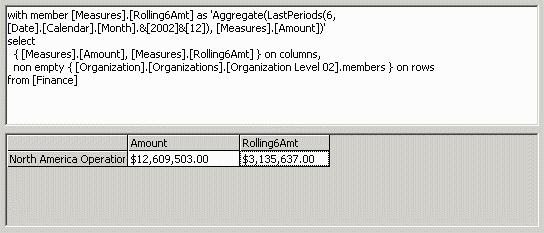
The Amount column shows the total sales amount over all time. The six-months column is considerably smaller, since its time is restricted.
As above, prompts may be used, as well as the Tail() or DefaultMember functions.
The same example in Strategy follows:
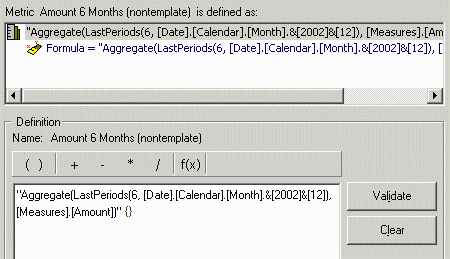
with set [dim0_select_members] as '{[Organization].[Organizations].[Organization Level 02].members}'
member [Measures].[FreeForm_0] as 'Aggregate(LastPeriods(6, [Date].[Calendar].[Month].&[2002]&[12]), [Measures].[Amount])'
select {[Measures].[Amount], [Measures].[FreeForm_0]} on columns,
non empty [dim0_select_members] on rows
from [Finance]
Third party code/SQL:
Strategy Technical Support does not provide or troubleshoot customized MDX queries, the custom logic noted in this article is provided as an as-is example. The syntax shown in this document can vary depending on the database. Please contact your database administrator to obtain the correct syntax for any desired customized MDX.
KB16517
