EducationSoftwareStrategy.com
StrategyCommunity

Knowledge Base

Product

Community

Knowledge Base

TopicsBrowse ArticlesDeveloper Zone

Product

Download SoftwareProduct DocumentationSecurity Hub

Education

Tutorial VideosSolution GalleryEducation courses

Community

GuidelinesGrandmastersEvents
x_social-icon_white.svglinkedin_social-icon_white.svg
Strategy logoCommunity

© Strategy Inc. All Rights Reserved.

LegalTerms of UsePrivacy Policy
  1. Home
  2. Topics

KB16537: 'The Web Server encountered an unknown runtime error' error occurs when trying to reach the Web Administration page in MicroStrategy Web


Jaime Perez

Vice President, Product Owner • MicroStrategy


Description

When looking to reach the Web Administration page, users get the following error message: 


The Web Server encountered an unknown runtime error. 


An error has occurred on this page.

View the image for reference:

ka04W000001Ix7qQAC_0EM440000002HiQ.png


Why is this happening?

This error message could be occurring due to missing or inaccessible ASCX files in the Web Server.
 

Solution

  1. Get the source code of the page.
  2. Right-click and choose View > Source.
  3. Look for a more specific error in the Stack Trace.

 
For this particular example, the following error was encountered:


System.UnauthorizedAccessException: Access to the path 'C:\Program Files (x86)\MicroStrategy\Web ASPx\asp\Admin_Path.ascx' is denied.
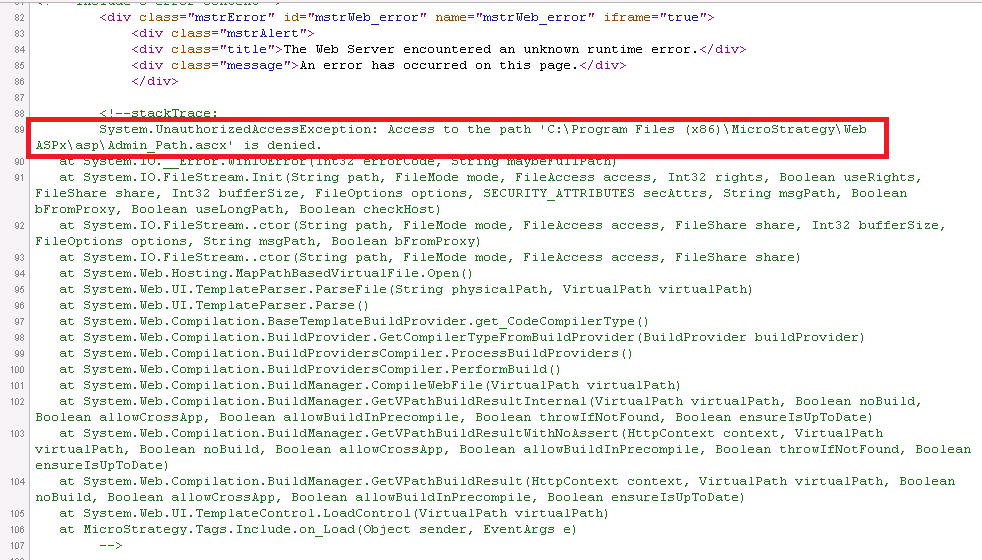

In order to correct this problem, make sure that the file mentioned on the stack trace (Admin_Path.ascx') has the correct permissions assigned. View the following image:
 

ka04W000001Ix7qQAC_0EM440000002HiV.png

Learning Resources

Interested in learning more about the Web Server or administration? Visit the Learning Center!


Comment

0 comments

Details

Knowledge Article

Published:

April 1, 2017

Last Updated:

August 11, 2022