EducationSoftwareStrategy.com
StrategyCommunity

Knowledge Base

Product

Community

Knowledge Base

TopicsBrowse ArticlesDeveloper Zone

Product

Download SoftwareProduct DocumentationSecurity Hub

Education

Tutorial VideosSolution GalleryEducation courses

Community

GuidelinesGrandmastersEvents
x_social-icon_white.svglinkedin_social-icon_white.svg
Strategy logoCommunity

© Strategy Inc. All Rights Reserved.

LegalTerms of UsePrivacy Policy
  1. Home
  2. Topics

KB16539: How to remove the Distribution Manager, Execution Engine, and Logging Server without using removal options in the MicroStrategy Narrowcast Server 9.x - 10.x Configuration Wizard


Community Admin

• Strategy


This article describes how to remove the Distribution Manager, Execution Engine, and Logging Server from a Narrowcast System without using the Narrowcast Configuration Wizard.

Under normal circumstances, the Distribution Manager, Execution Engine, and Logging Service (DM, EE, and MLS) should be configured using the Strategy Narrowcast Server Configuration Wizard. However, there are situations where either the Configuration Wizard should not be used (e.g. when restoring a Strategy Narrowcast Server system from a database backup) or when for some reason, the removal options in the Configuration Wizard are not available, as shown below:

ka04W000000OhEoQAK_0EM440000002BTo.jpeg

 
To do this, follow the steps below:

  • The Distribution Manager and Execution Engine can be deleted by right-clicking the defined machine and choosing Delete, as shown below:
ka04W000000OhEoQAK_0EM440000002BTm.jpeg
  • For the Strategy Logging Server, the delete option may not be available and the machine name may be un-editable, as shown below:
ka04W000000OhEoQAK_0EM440000002BTw.jpeg
ka04W000000OhEoQAK_0EM440000002NC9.jpeg
  • In such situations, the MLS reference can be cleared in the following ways:
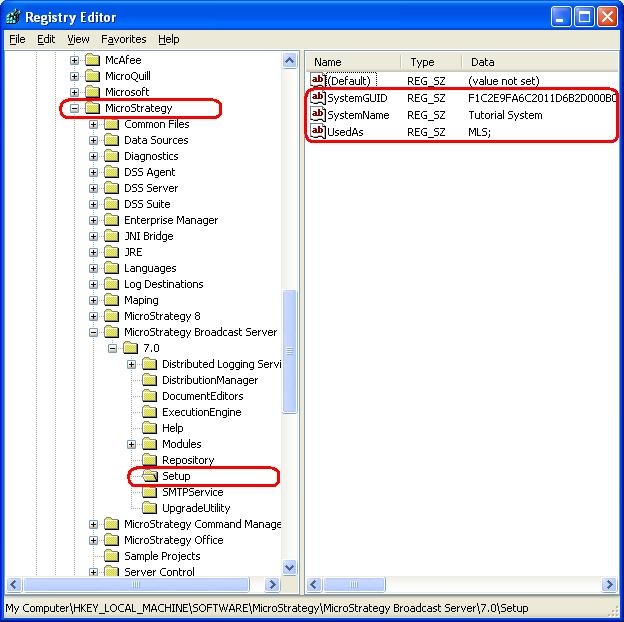
    • Modifying the registry key \\HKEY_LOCAL_MACHINE\SOFTWARE\MicroStrategy\Strategy Broadcast Server\7.0\Setup. Delete the three keys SystemGUID, SystemName, and UsedAs, as shown below:
ka04W000000OhEoQAK_0EM440000002BU1.jpeg
    • Note: for 64-bit Windows, the registey key is at: HKEY_LOCAL_MACHINE\SOFTWARE\Wow6432Node\MicroStrategy\Strategy Broadcast Server\7.0\Setup
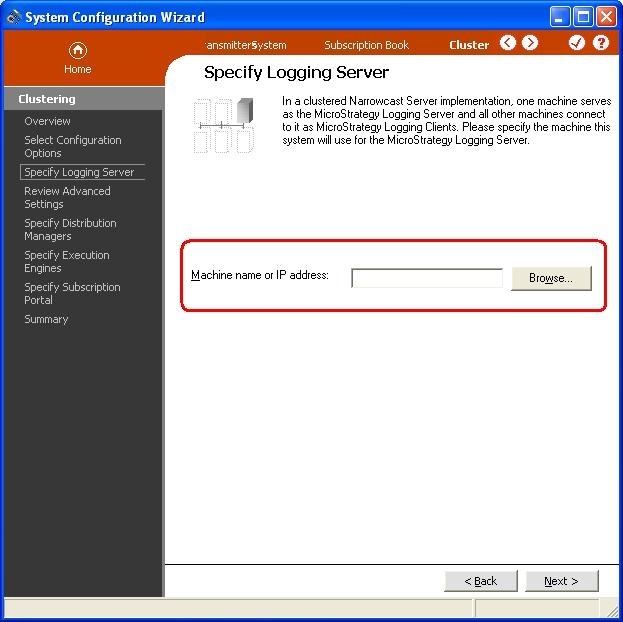
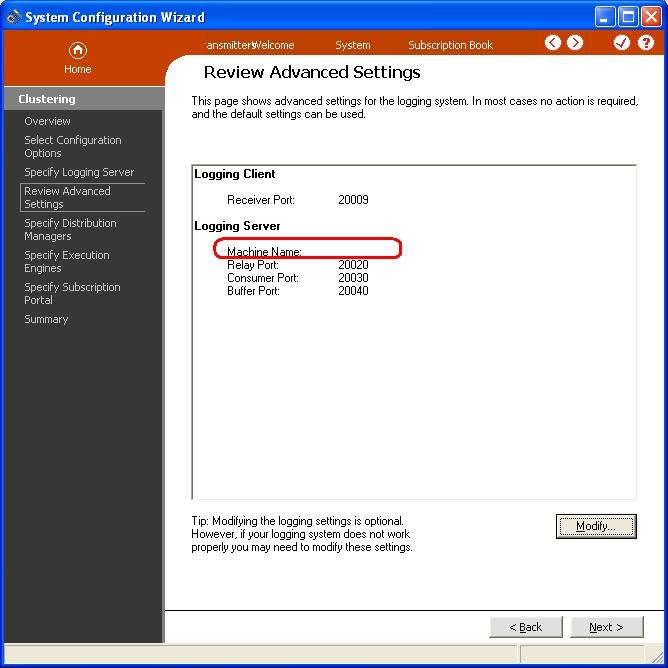
    • Using the 'Select and configure multiple machines for a Narrowcast Server System' option of the Configuration Wizard, leave the machine name empty for the MLS page, click Next twice to process this value, and then Cancel out of the Configuration before the DM and EE pages, as illustrated below:
ka04W000000OhEoQAK_0EM440000002BTl.jpeg
ka04W000000OhEoQAK_0EM440000002NCE.jpeg
ka04W000000OhEoQAK_0EM440000002BTq.jpeg

Registry Modification:
WARNING:
Modifying registry values incorrectly may cause serious, system-wide problems that may require the re-installation of Microsoft Windows NT. Any edit of the registry is done at the user`s own risk. Since these are user-initiated changes, they are not covered by any Strategy warranty. If using Microsoft Windows NT, the user should backup the registry and/or update an Emergency Repair Disk (ERD) prior to alterations.


Comment

0 comments

Details

Knowledge Article

Published:

May 30, 2017

Last Updated:

May 30, 2017