EducationSoftwareStrategy.com
StrategyCommunity

Knowledge Base

Product

Community

Knowledge Base

TopicsBrowse ArticlesDeveloper Zone

Product

Download SoftwareProduct DocumentationSecurity Hub

Education

Tutorial VideosSolution GalleryEducation courses

Community

GuidelinesGrandmastersEvents
x_social-icon_white.svglinkedin_social-icon_white.svg
Strategy logoCommunity

© Strategy Inc. All Rights Reserved.

LegalTerms of UsePrivacy Policy
  1. Home
  2. Topics

KB16543: How to create an attribute form by concatenating data from more than two columns in MicroStrategy


Community Admin

• Strategy


How to create an attribute form by concatenating data from more than two columns in MicroStrategy

Users may want to create an attribute form by concatenating three columns (ex. '1-Q1-2001') from the table given below. This requirement can be achieved by using an ApplySimple statement in the expression of the attribute form.


Specifies the type of method used for passing the selector answers
IDQuarterYear1Q120012Q220023Q320034Q42004

Specifies the type of method used for passing the selector answers
IDQuarterYear1Q120012Q220023Q320034Q42004

Specifies the type of method used for passing the selector answers
IDQuarterYear1Q120012Q220023Q320034Q42004

Specifies the type of method used for passing the selector answers
IDQuarterYear1Q120012Q220023Q320034Q42004

Specifies the type of method used for passing the selector answers
IDQuarterYear1Q120012Q220023Q320034Q42004

Specifies the type of method used for passing the selector answers
IDQuarterYear1Q120012Q220023Q320034Q42004

Specifies the type of method used for passing the selector answers
IDQuarterYear1Q120012Q220023Q320034Q42004

Specifies the type of method used for passing the selector answers
IDQuarterYear1Q120012Q220023Q320034Q42004

Specifies the type of method used for passing the selector answers
IDQuarterYear1Q120012Q220023Q320034Q42004

Specifies the type of method used for passing the selector answers
IDQuarterYear1Q120012Q220023Q320034Q42004

Specifies the type of method used for passing the selector answers
IDQuarterYear1Q120012Q220023Q320034Q42004

Specifies the type of method used for passing the selector answers
IDQuarterYear1Q120012Q220023Q320034Q42004

Specifies the type of method used for passing the selector answers
IDQuarterYear1Q120012Q220023Q320034Q42004

Specifies the type of method used for passing the selector answers
IDQuarterYear1Q120012Q220023Q320034Q42004

Specifies the type of method used for passing the selector answers
IDQuarterYear1Q120012Q220023Q320034Q42004

To do this, follow the steps below:
 

  • In Strategy Developer, create a new attribute by navigating to File > New > Attribute.
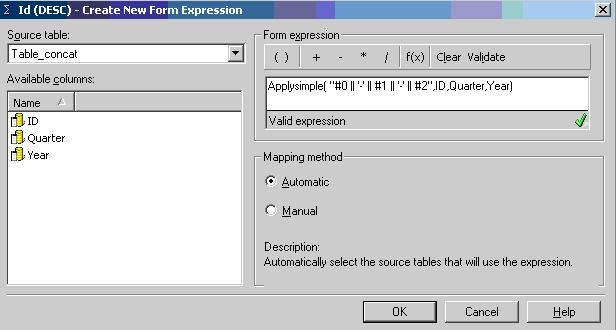
  • In the Create New Form Expression window in the Attribute Editor, select the above table as the source table and use the following ApplySimple statement to define the expression:
    Applysimple( "#0 '-' #1 '-' #2", ID, Quarter, Year)
  • Note: In Oracle, the CONCAT function can be used, but this function is only limited to using two columns. The concatenate symbol to be used is dependent on the type of database being used. In this example, Oracle 9i database was used.
     
ka04W000000OecYQAS_0EM440000002FBR.jpeg
  • Define the required relationships for the attribute and update the schema.
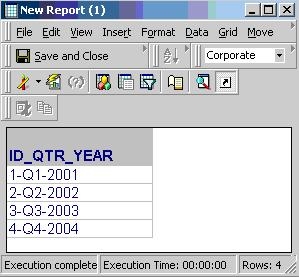
  • When this attribute is used in the report, the attribute elements are as shown below:
ka04W000000OecYQAS_0EM440000002FBO.jpeg

Comment

0 comments

Details

Knowledge Article

Published:

June 8, 2017

Last Updated:

June 8, 2017