EducationSoftwareStrategy.com
StrategyCommunity

Knowledge Base

Product

Community

Knowledge Base

TopicsBrowse ArticlesDeveloper Zone

Product

Download SoftwareProduct DocumentationSecurity Hub

Education

Tutorial VideosSolution GalleryEducation courses

Community

GuidelinesGrandmastersEvents
x_social-icon_white.svglinkedin_social-icon_white.svg
Strategy logoCommunity

© Strategy Inc. All Rights Reserved.

LegalTerms of UsePrivacy Policy
  1. Home
  2. Topics

KB16551: In MicroStrategy Narrowcast Server, users cannot start the Distribution Manager and the error ‘Network status info: Failed to ping host "localhost" with timeout set to 1000.’ occurs


Community Admin

• Strategy


In MicroStrategy Narrowcast Server, users cannot start the Distribution Manager and the error ‘Network status info: Failed to ping host "localhost" with timeout set to 1000.’ occurs

SYMPTOM:
Users cannot start the Distribution Manager in Strategy Narrowcast Server and the following error occurs:
 

ka04W000000OeIdQAK_0EM440000002BSn.jpeg

 
System is not running.
Under the System Message Viewer, users can find the following error message:
 
Network status info: Failed to ping host "localhost" with timeout set to 1000.
CAUSE:
One of the following reasons can prevent the Distribution Manager from starting:

  1. The NT account which runs Distribution Manager does not have administrative privilege to run the 'ping' command.
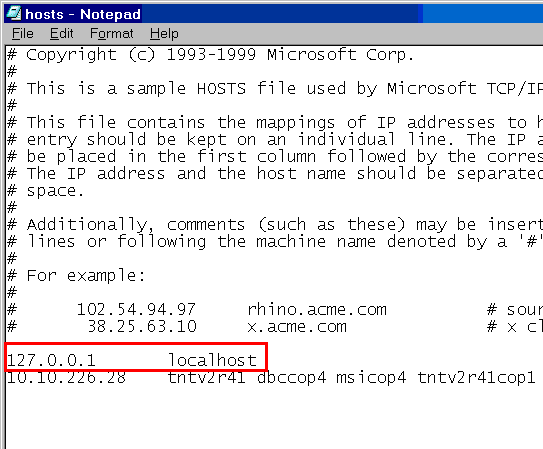
  2. The HOSTS file of the machine does not contain the 'localhost' entry.
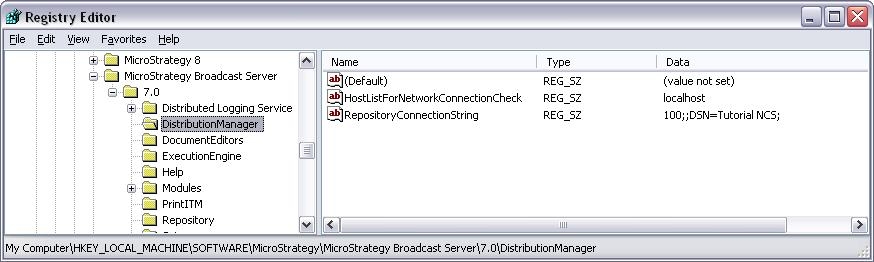
  3. 'localhost' is not populated under 'HostListForNetworkConnectionCheck' registry key.

ACTION:
Follow the steps below to resolve this issue:
 

  • Make sure the Windows account has administrative privileges in the Strategy Narrowcast Server machine.
  • Go to C:\WINNT\system32\drivers\etc to check the 'hosts' file and make sure the 'localhost' entry is populated correctly, as shown below:
ka04W000000OeIdQAK_0EM440000002BSo.jpeg
  • Go to HKEY_LOCAL_MACHINE \Software\MicroStrategy\Strategy Broadcast Server\7.0\DistributionManager. Locate the 'HostListForNetworkConnectionCheck' registry and make sure the value is 'localhost' as shown below:
ka04W000000OeIdQAK_0EM440000002BSm.jpeg

WARNING:
Modifying registry values incorrectly may cause serious, system-wide problems that may require the re-installation of Microsoft Windows NT. Any edit of the registry is done at the user's own risk. Since these are user-initiated changes, they are not covered by any Strategy warranty. If using Microsoft Windows NT, the user should backup the registry and/or update an Emergency Repair Disk (ERD) prior to alterations.


Comment

0 comments

Details

Knowledge Article

Published:

June 12, 2017

Last Updated:

June 12, 2017