SUMMARY
During the life of a Narrowcast Service, it will usually only occupy two states: Active or Inactive. Some Narrowcast Services will occupy the state of 'Not Demanded'. Where does this state fit in the Narrowcast Service State paradigm?
Active vs. Inactive
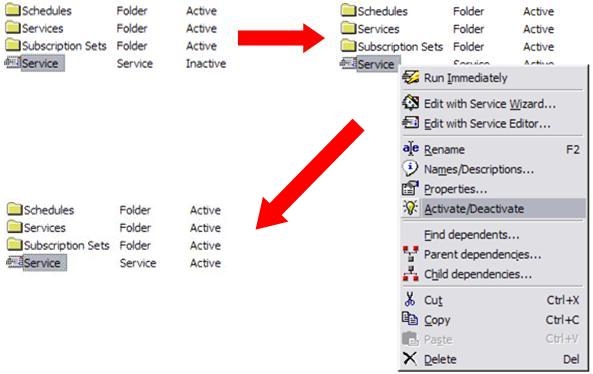
Active and Inactive are both states that a service can occupy over the course of its lifetime. These two states are permanent changes to the service. In this sense, permanent means that once manually changed to Active/Inactive through the Narrowcast Administrator user interface, a service will stay in that state until it is toggled again by the user. There is no change to this state by the Narrowcast System. Below is an example of a change in service from Active to Inactive:
Not Demanded vs. Demanded
Not Demanded is a term used to describe the type of Narrowcast Schedule that is loaded into the Distribution Manager. Inside the Schedule Editor, there is a check box for creating an 'On-Demand' Schedule. This type of Schedule is normally reserved for the Send Now Schedules as noted in the Schedule Editor but the functionality is available to other Schedules. The reason for this requirement is that the Send Now Schedule will run the Send Now Service once every minute. If the Schedule is set to Active, then the Send Now Service will run to completion every minute, logging all progress, no matter the load. If there are many Strategy Project Information Sources configured for Web Deliveries, this will create unnecessary clutter in the Distribution Manager and the DElogs.
Setting the Send Now Schedule to Not Demanded sets the Schedule inactive temporarily, while it has no tasks, similar to a waiting state. In effect, the Schedule is waiting for work. The amount of work that needs to be done is determined by the users in the Subscription Set of the Services attached to that Not Demanded Schedule. No users in the Subscription Set(s) in the Service(s) means no work to complete. Not Demanded says that in this case, the Schedule should remain dormant until there is a User in the attached Service's Subscription Set(s).
Executing a Not Demanded Schedule
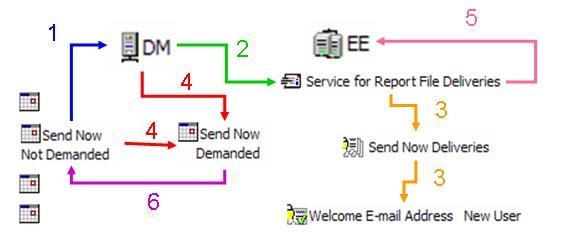
When a Service tied to a Not Demanded Schedule contains at least one User in the Subscription Set(s) is executed, the status of the Schedule will change to Demanded. Just as Not Demanded is analigous to a temporary Inactive State, Demanded is analigous to a status of temporarily Active. During this time, the Service Execution will log and the Service will run to completion as if it was Active. However, once the last attached Service is done executing the status will change back to Not Demanded. The image below depicts this change:
Not Demanded/Demanded vs. Inactive/Active
The key difference between the two pairs of states is permanent vs. temporary. Active/Inactive are states that instantiated and changed by the user through the Narrowcast Administrator user interface and Not Demanded/Demanded are special states manipulated by the Narrowcast System at run-time.
KB16555
