SYMPTOM:
When administrators attempt to execute the Data Load manually from the Strategy Enterprise Manager 9.x Console, they see the following error message:
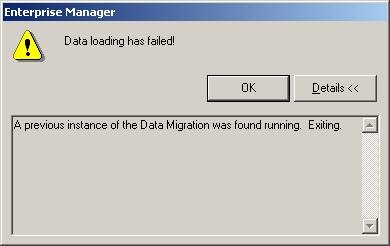
A previous instance of the Data Migration was found running. Exiting.
The MSTRMigration.log file does not show any errors, but does show some incomplete migrations, as shown below::
-------------------------------------------------------------------------------------
Strategy Incorporated - Enterprise Manager
9.4.1 (9.4.1010.0103)
This is an activity log for the Data Migration component of Enterprise Manager.
8/27/2013 4:26:16 PM
-------------------------------------------------------------------------------------
8/27/2013 4:29:10 PM SET DATEFORMAT MDY
8/27/2013 4:29:10 PM SET TRANSACTION ISOLATION LEVEL READ UNCOMMITTED
8/27/2013 4:29:10 PM SELECT EM_PROP_VALUE FROM EM_PROPS WHERE EM_PROP_NAME = 'WAREHOUSE VERSION'
8/27/2013 4:29:10 PM SELECT PROP_VAL FROM MSI_STATS_PROP WHERE PROP_NAME = 'VERSION'
8/27/2013 4:29:10 PM SELECT COUNT(1) FROM EM_PROPS WHERE EM_PROP_NAME = 'OWNER MACHINE'
8/27/2013 4:29:10 PM SELECT EM_PROP_VALUE FROM EM_PROPS WHERE EM_PROP_NAME = 'OWNER MACHINE'
8/27/2003 4:29:10 PM SELECT COUNT(1) FROM EM_LOG
#####################################################################################
-------------------------------------------------------------------------------------
Strategy Incorporated - Enterprise Manager
9.4.1 (9.4.1010.0103)
This is an activity log for the Data Migration component of Enterprise Manager.
8/27/2013 4:29:10 PM
-------------------------------------------------------------------------------------
8/27/2013 6:13:17 PM SET DATEFORMAT MDY
8/27/2013 6:13:17 PM SET TRANSACTION ISOLATION LEVEL READ UNCOMMITTED
8/27/2013 6:13:17 PM SELECT EM_PROP_VALUE FROM EM_PROPS WHERE EM_PROP_NAME = 'WAREHOUSE VERSION'
8/27/2013 6:13:17 PM SELECT PROP_VAL FROM MSI_STATS_PROP WHERE PROP_NAME = 'VERSION'
8/27/2013 6:13:17 PM SELECT COUNT(1) FROM EM_PROPS WHERE EM_PROP_NAME = 'OWNER MACHINE'
8/27/2013 6:13:17 PM SELECT EM_PROP_VALUE FROM EM_PROPS WHERE EM_PROP_NAME = 'OWNER MACHINE'
8/27/2013 6:13:17 PM SELECT COUNT(1) FROM EM_LOG
#####################################################################################
Some other symptoms could include:
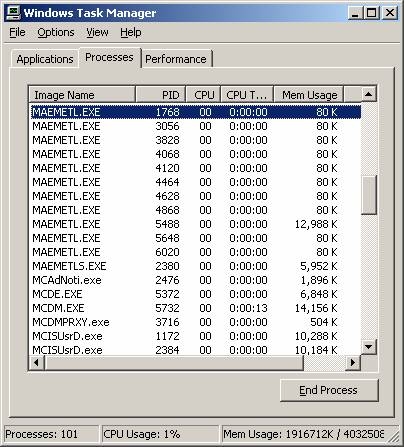
CAUSE:
There are a few possible causes for the above error message. These are described below:
NOTE: Stopping and restarting the Data Load Service is not enough to stop the MAEMETL.exe process.
ACTION:
As mentioned above, the first case should not be considered an error. Administrators simply have to wait for the Data Load that is running in the back to finish to be able to execute the Data Load manually.
For the second case, it is necessary to end any outstanding MAEMETL.EXE processes that can be seen in the Windows Task Manager. To do this, open Windows Task Manager and look for the MAEMETL.exe process and click on the 'End Process' button. Run the data load again after killing all the MAEMETL.exe processes.
In some instances, MAEMETL.EXE processes might still appear in the Task Manager. In this case kill any of these outstanding processes using the kill command as seen below. The command can be used to kill processes by providing their PID (process ID), as shown below:
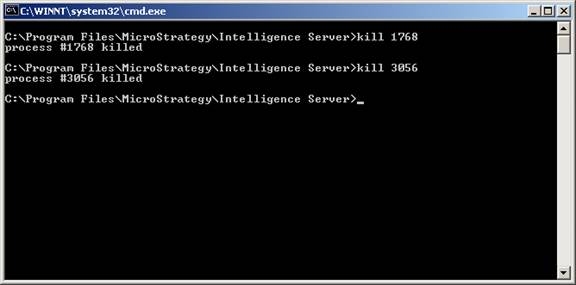
C:\Program Files\MicroStrategy\Intelligence Server\kill 3056
KB16583
